
The Bug That Taught Me Livewire’s Lifecycle Hooks (The Hard Way)
I was building a multi-step checkout form for a small clothing brand’s website, three steps, cart review, shipping details, then payment confirmation. Simple enough. Except every time a user typed their phone number in step two, the whole form would randomly reset back to step one.
I spent almost two hours convinced it was a validation bug. Checked my rules, checked my session logic, even added random dd() calls everywhere trying to catch it. Turns out, the actual issue had nothing to do with validation at all. I was resetting a public property inside mount() that should have only run once, but because I misunderstood when mount() actually fires versus other hooks, it kept wiping out data I needed to persist.
That bug is what finally forced me to properly sit down and learn Livewire’s lifecycle hooks instead of just guessing my way through components like I’d been doing for months. Once it clicked, so many weird bugs I’d shrugged off before suddenly made complete sense.
If you’ve ever felt like your Livewire component is doing something at the “wrong time” and you can’t figure out why, this is probably exactly what you’re missing too.
What Lifecycle Hooks Actually Are (No Jargon, Promise)
Think of a Livewire component like a person going through a workday. They arrive at the office (that’s mount), they do stuff throughout the day whenever something happens (that’s the update hooks), and eventually they go home (that’s basically the render happening).
Livewire hooks are just specific moments in that “workday” where you can run your own code. Instead of guessing when something happens, Livewire gives you named checkpoints, and you hook into whichever one matches what you’re trying to do.
Once I stopped thinking of them as some advanced technical concept and just thought of them as “checkpoints in a component’s life,” everything got way easier to reason about.
The Hooks I Actually Use In Real Projects
There are quite a few lifecycle hooks in Livewire, but honestly, in real client work, I keep coming back to the same handful over and over. Let’s go through them properly.
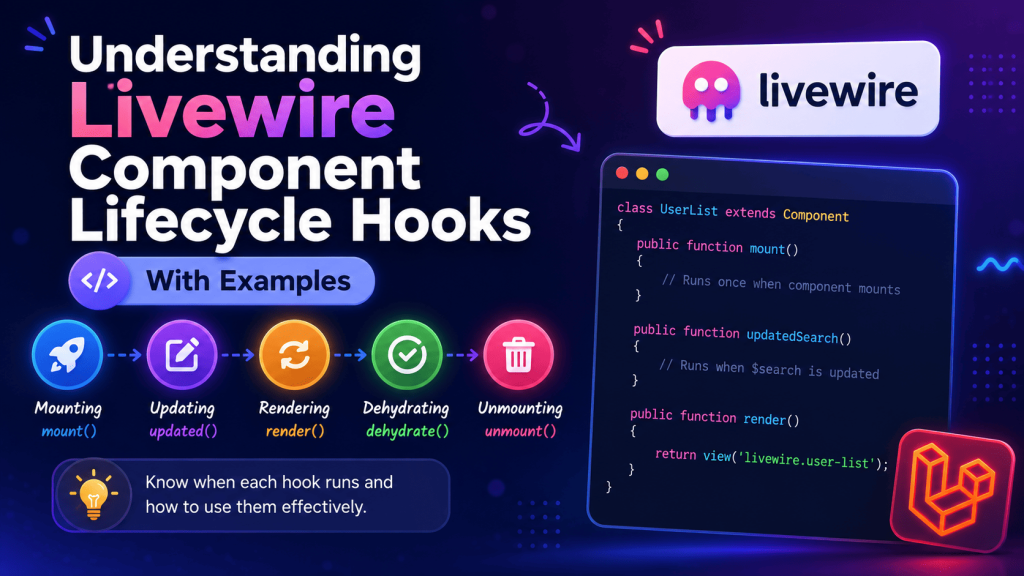
mount()
This runs once, the very first time the component loads. Think of it like the constructor for your component’s initial state.
class CheckoutForm extends Component
{
    public $step = 1;
    public $cart;

    public function mount()
    {
        $this->cart = session()->get('cart', []);
    }
}
Here’s exactly the mistake I made. I had this inside mount():
public function mount()
{
    $this->step = 1;
}
The problem is, mount() only runs on the initial page load, not on every single Livewire request afterward, that part I understood correctly. But I had wrongly assumed some other update was also calling mount() again, when actually the real bug was a totally separate property binding issue causing a full component reset. It taught me to actually add debugging output inside mount() to confirm exactly when it was firing, instead of assuming.
public function mount()
{
    logger('Mount fired');
    $this->step = 1;
}
Checking the Laravel log file (I use Laravel Telescope for this now, makes debugging way easier than tailing laravel.log manually) showed me mount() was firing exactly once like it should. The actual bug was somewhere else entirely, which brings me to the next hook.
updated() and updatedPropertyName()
This fires whenever a public property changes, either the generic updated() for any property, or a specific one like updatedPhoneNumber() for just that one field.
public $phoneNumber;

public function updatedPhoneNumber($value)
{
    $this->phoneNumber = preg_replace('/[^0-9]/', '', $value);
}
This turned out to be exactly where my checkout bug lived. I had accidentally bound the phone number input to the same property name used somewhere else in a parent component, and updating one was triggering an unexpected re-render of the whole child component, which reset the step back to 1. Once I renamed the property to something unique and specific, the bug disappeared completely.
Lesson learned: always double check your property names aren’t clashing between parent and child components, especially if you’re nesting Livewire components inside each other.
rendering() and rendered()
These fire right before and right after the view actually renders. I don’t use these often, but they’ve saved me once in a real project where I needed to manipulate some data specifically for display purposes without permanently changing the underlying property.
public function rendering(View $view)
{
    $view->totalItems = count($this->cart);
}
This was useful for a dashboard project where I needed a calculated value purely for the current render, without cluttering the component’s actual state with extra properties I didn’t need to track between requests.
boot() and booted()
These run on every single request to the component, not just the first one like mount(). I use boot() mostly for setting up dependencies or services that the component needs access to every time, not just once.
protected $productService;

public function boot(ProductService $productService)
{
    $this->productService = $productService;
}
I genuinely didn’t understand the difference between mount() and boot() for the longest time. The simplest way I can explain it: mount() is for setting initial data, boot() is for setting up tools your component needs every time it does anything at all, including after every single interaction, not just the first load.
dehydrate() and hydrate()
Honestly, these two took me the longest to actually need in a real project. They deal with what happens to your component’s data between requests, since Livewire technically destroys and rebuilds your PHP component object on every single interaction behind the scenes (this part genuinely surprised me when I first learned it).
public function dehydrate()
{
    logger('Component about to be serialized: ' . $this->step);
}
I used this once while debugging a weird issue where a Carbon date object wasn’t surviving between requests properly. Turns out, some complex objects don’t serialize cleanly by default, and dehydrate()/hydrate() let you control exactly how that data gets packed and unpacked.
Step-by-Step: Building a Small Example To See These In Action
If you want to actually watch these hooks fire in real time instead of just reading about them, here’s a quick component you can build in about five minutes.
php artisan make:livewire LifecycleDemo
class LifecycleDemo extends Component
{
    public $count = 0;

    public function mount()
    {
        logger('mount fired');
    }

    public function boot()
    {
        logger('boot fired');
    }

    public function updated($property)
    {
        logger("updated fired for {$property}");
    }

    public function rendering()
    {
        logger('rendering fired');
    }

    public function increment()
    {
        $this->count++;
    }

    public function render()
    {
        return view('livewire.lifecycle-demo');
    }
}
Add a simple button in the Blade view calling wire:click="increment", then open your terminal and run:
tail -f storage/logs/laravel.log
Click the button a few times and genuinely watch the order these hooks fire in your terminal. This exercise alone taught me more about Livewire’s actual request cycle than any documentation page did, because you’re seeing the real order happen live instead of just reading about it abstractly.
Common Mistakes I See (And Made Myself)
Assuming mount() runs on every update. It doesn’t. It’s a one-time thing per component instance. If you need logic to run on every interaction, you’re looking for boot() or updated() depending on what triggers it.
Putting heavy database queries inside boot(). Since boot() runs on every single request to the component, including tiny interactions like typing in a search box, putting an expensive query there will genuinely slow down your entire app. I did this once with a query that joined three tables, and typing a single character in an unrelated search field made the whole page lag noticeably. Moved that logic into mount() instead since it only needed to run once, and the lag disappeared instantly.
Forgetting that public properties reset differently than you’d expect. Since Livewire rebuilds the component object on every request, any property not explicitly tracked or persisted (through the database, session, or Livewire’s own property binding) won’t magically remember its previous state unless you’re deliberately handling that yourself.
Overusing updated() for validation. I used to validate on every single keystroke using the generic updated() hook, which technically works, but it made typing feel sluggish on slower connections. Debouncing the input with wire:model.live.debounce.500ms combined with validating only on form submission ended up feeling much smoother for actual users.
Where Understanding This Actually Helped Me In Real Projects
Beyond fixing that checkout bug, properly understanding these hooks helped me on:
- A restaurant ordering system where
updated()on the quantity field needed to recalculate the total price instantly without a full page reload - An admin panel where
mount()needed to load a specific record’s data only once, whileboot()handled setting up a permissions service on every single request - A multi-tab settings page where
rendering()let me inject extra display-only data without permanently storing it as a tracked property
None of these were particularly complicated once I actually understood which hook was meant for which situation. Before that, I was basically guessing and hoping things worked, which occasionally they did, until they very obviously didn’t.
Final Thoughts
Lifecycle hooks in Livewire aren’t something you need to memorize all at once. Honestly, I still don’t use half of the less common ones in real projects. But knowing the core few, mount(), updated(), and boot() especially, and actually understanding when each one fires instead of assuming, will save you from a lot of confusing, hard-to-trace bugs down the line.
If you’re still fuzzy on any of these, genuinely just build that small logging example above and watch it happen in your terminal. Seeing the actual order of events fire in real time made this click for me way faster than any explanation ever did, including, honestly, this one.