





My Signup Form Was Hammering The Database On Every Keystroke, Here’s How I Fixed It
I built a signup form for a small SaaS product, one of those “choose your username” fields that checks availability as you type, like a lot of apps do these days. Felt like a nice touch. Client loved it in the demo.
Then it went live, and within a week, the hosting provider (a shared hosting plan through a local Pakistani provider, nothing fancy) sent a warning email about unusually high database load. I checked the query logs and nearly panicked. A single user typing a 12-character username was firing off 12 separate database queries, one for every keystroke.
That’s when I actually learned the difference between wire:model and wire:model.live, and why picking the wrong one for the wrong situation can genuinely tank your app’s performance without throwing a single error message to warn you.
If you’re using Livewire for real-time validation and things feel laggy, or worse, your server bill is quietly climbing, this is probably exactly why.
The Core Thing I Didn’t Understand At First
wire:model in Livewire 3 changed behavior compared to Livewire 2, and this tripped me up hard when I first upgraded a project. In Livewire 3, plain wire:model is deferred by default, meaning it only syncs data with the server when something else triggers a network request, like clicking a button, not on every keystroke.
If you actually want real-time updates as someone types, you need wire:model.live explicitly. I hadn’t fully internalized this distinction, and my username availability checker was using .live on a field where I genuinely didn’t need updates that aggressively.
Once I understood this properly, fixing the performance issue took about ten minutes.
Step 1: Understanding Your Actual Options
Here’s the breakdown I wish someone had explained to me clearly from the start:
wire:model— waits until the next network request (form submission, button click, etc.) to sync data. No live updates.wire:model.live— sends a request to the server on every single change, basically every keystroke for text inputs.wire:model.live.debounce.500ms— same as live, but waits until the user pauses typing for the specified time before sending the request.wire:model.blur— only syncs when the input loses focus, meaning the user clicked away or tabbed to the next field.
For that username field, I was using plain .live with zero debounce, which meant literally every keystroke triggered a full server round trip to check the database.
Step 2: Fixing the Username Checker Properly
Here’s what the component looked like originally, the version that caused the overload:
class SignupForm extends Component
{
    public $username;
    public $usernameAvailable = null;

    public function updatedUsername($value)
    {
        $this->usernameAvailable = !User::where('username', $value)->exists();
    }

    public function render()
    {
        return view('livewire.signup-form');
    }
}
<input type="text" wire:model.live="username" placeholder="Choose a username">

@if ($usernameAvailable === true)
    <span class="text-green-500">Username available!</span>
@elseif ($usernameAvailable === false)
    <span class="text-red-500">Username already taken</span>
@endif
This works, technically, but it’s exactly the setup that caused the database hammering issue. Here’s the fixed version I deployed afterward:
<input type="text" wire:model.live.debounce.500ms="username" placeholder="Choose a username">
That single change, adding .debounce.500ms, meant Livewire waits half a second after the user stops typing before actually checking the database, instead of checking on every single character. For someone typing a normal-speed username, this cut database queries down from roughly 10-12 per attempt to just 1 or 2. Massive difference for basically zero extra code.
Step 3: Adding a Proper Loading State
Once the debounce was in place, I noticed a small UX issue, there was a slight delay between when someone stopped typing and when the availability message actually appeared, which made it briefly look like nothing was happening.
Livewire’s wire:loading directive fixed this nicely:
<input type="text" wire:model.live.debounce.500ms="username" placeholder="Choose a username">

<div wire:loading wire:target="username">
    <span class="text-gray-400">Checking availability...</span>
</div>

<div wire:loading.remove wire:target="username">
    @if ($usernameAvailable === true)
        <span class="text-green-500">Username available!</span>
    @elseif ($usernameAvailable === false)
        <span class="text-red-500">Username already taken</span>
    @endif
</div>
Small addition, but it made the whole interaction feel intentional instead of laggy.
Step 4: Real-Time Validation Beyond Just Availability Checks
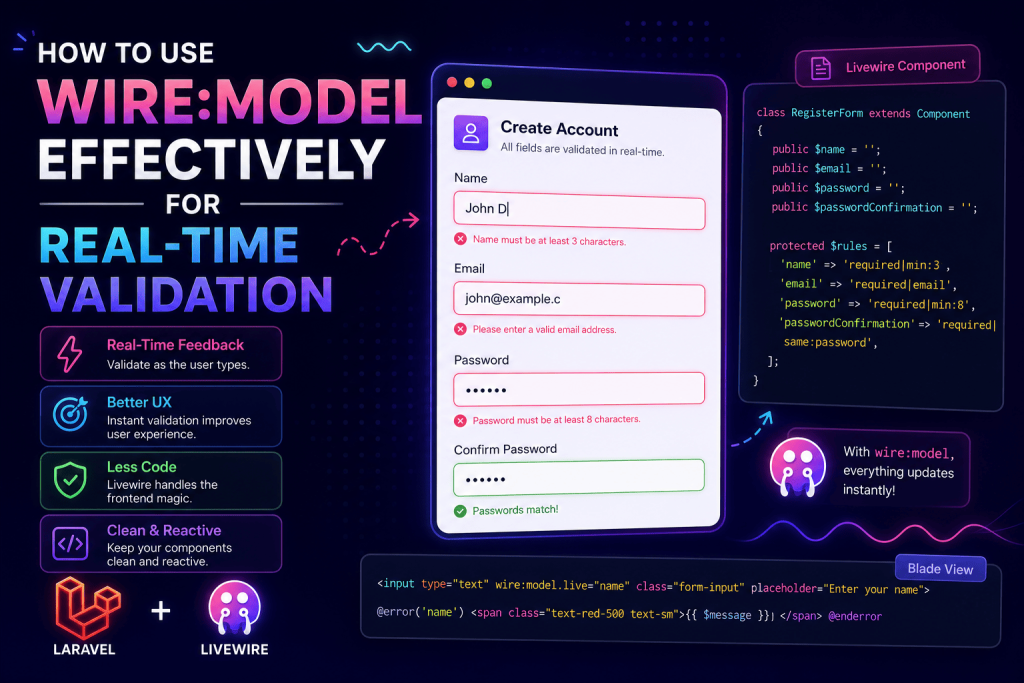
Once I got comfortable with debouncing properly, I started using the same pattern for actual validation rules too, not just custom availability checks. Here’s a password confirmation field I built for the same signup form:
public $password;
public $passwordConfirmation;

protected $rules = [
    'password' => 'required|min:8',
    'passwordConfirmation' => 'same:password',
];

public function updatedPasswordConfirmation()
{
    $this->validateOnly('passwordConfirmation');
}
<input type="password" wire:model.live.debounce.500ms="password" placeholder="Password">
<input type="password" wire:model.live.debounce.500ms="passwordConfirmation" placeholder="Confirm Password">

@error('passwordConfirmation') <span class="text-red-500">{{ $message }}</span> @enderror
validateOnly() was something I initially skipped over in the docs, but it’s genuinely useful here, it only validates that one specific field instead of triggering validation for the entire form on every change, which keeps things fast even as your form grows bigger.
Step 5: Choosing the Right Modifier For Each Field Type
This is the part that took me actual real-world testing to get a feel for, not something I picked up just from reading documentation. Different fields genuinely need different approaches:
Search or filter inputs — I use .live.debounce.300ms here. Fast enough to feel responsive, slow enough to not overload the server with every keystroke.
Username or email availability checks — .live.debounce.500ms to .live.debounce.800ms works well. These checks usually hit the database, so a slightly longer pause before firing is worth the tiny extra delay.
Simple required field validation (like a name field) — Honestly, I just use wire:model.blur here now. There’s no real benefit to validating “is this field empty” on every keystroke. Waiting until the user clicks away feels completely natural and saves unnecessary requests.
Checkboxes, toggles, dropdowns — Plain wire:model.live is fine here since these don’t fire repeatedly like typing does, it’s a single change event, not a stream of keystrokes.
Anything inside a multi-step form that doesn’t need instant feedback — Just plain wire:model without .live at all, since Livewire 3 defers it until the next actual request anyway, like clicking “Next.”
A Mistake I Made That’s Worth Mentioning Separately
On a different project, a hospital appointment booking form, I used .live (no debounce) on a date picker field that triggered an availability check against existing appointments. Dates don’t get typed character by character like text does, so I assumed debouncing wasn’t necessary there.
That assumption was mostly fine, until a user on a touchscreen device (I tested this myself on an average Android tablet) triggered the change event multiple times rapidly while scrolling through the date picker’s dropdown options. Same overload problem, just from an unexpected input type. Adding a small debounce there too, even just 200ms, resolved it completely.
Lesson learned: don’t assume debouncing is only relevant for text inputs. Test with an actual variety of input methods, not just your mouse and keyboard on a laptop.
Common Mistakes I’d Warn You About
Defaulting to .live everywhere without thinking about it. It’s tempting to just make everything live for that snappy, real-time feel, but every live field is a potential server request on every interaction. Be intentional about which fields actually benefit from instant feedback.
Forgetting wire:target on loading indicators. Without specifying wire:target, your loading state might show up for unrelated actions elsewhere on the page, which confused a client once during a demo when a loading spinner appeared for a completely different field than expected.
Not testing on an actual slow connection. Everything felt instant on my office WiFi. Testing on throttled mobile data (Chrome DevTools has a network throttling option under the Network tab that’s genuinely useful for this) showed me how laggy things felt for users without fast connections, which pushed me toward slightly longer debounce times than I originally planned.
Validating the entire form’s rules on every single field change. Use validateOnly() for individual fields instead of calling validate() broadly during real-time checks. This keeps each request lightweight instead of re-checking fields the user hasn’t even touched yet.
Ignoring database indexing on frequently checked columns. Even with debouncing, if your username or email column isn’t indexed, that database query still gets slower as your users table grows. Add an index if you’re checking availability against any column regularly:
Schema::table('users', function (Blueprint $table) {
    $table->index('username');
});
Where I’ve Reused This Pattern Since
Beyond that original signup form, the same debounced wire:model.live approach has come in handy for:
- A used car marketplace’s search filters, updating listings live as users adjusted price range sliders
- A coupon code field on a checkout page, validating codes as customers typed without needing a separate “apply” button
- A hotel booking form checking room availability as users selected different date ranges
Final Thoughts
The database overload scare taught me something that honestly feels obvious in hindsight, real-time doesn’t have to mean instant on every single keystroke. A half-second debounce is imperceptible to most users but makes a massive difference in how many requests your server actually handles.
If you’re building something with live validation right now, don’t just reach for .live out of habit. Think about what the field is actually doing, whether it hits the database, and how often it realistically needs to check. Your server, and possibly your hosting bill, will thank you for it.