
I Was Calculating the Same Order Total in Five Different Places, Then I Found Generated Columns
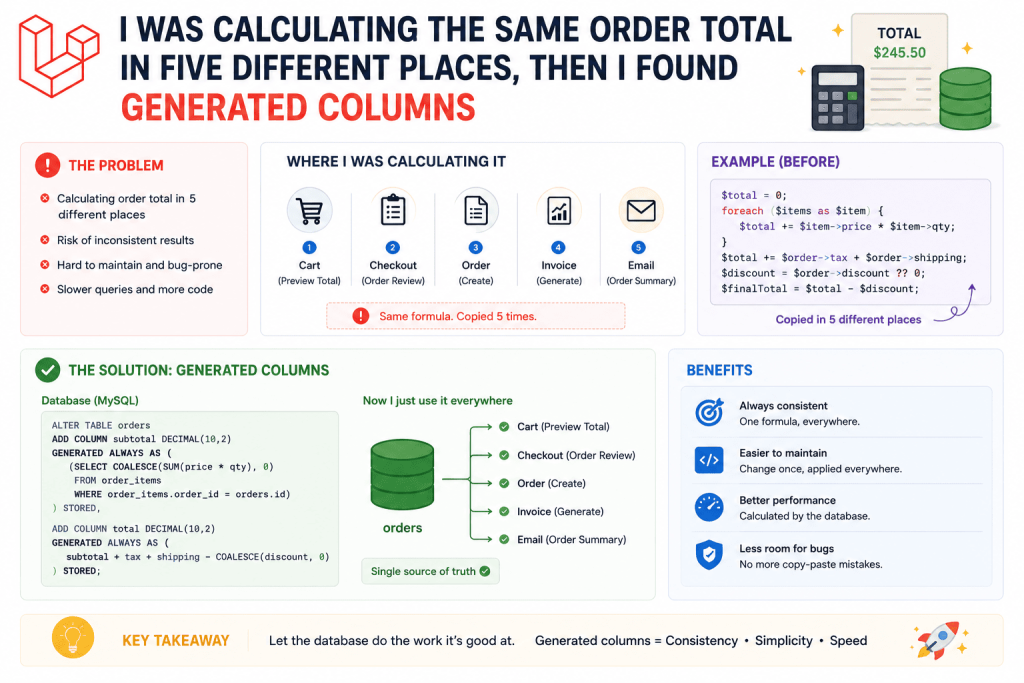
An order management system I built stored quantity and unit_price separately for each order item, standard enough setup. The problem was, I needed the actual total (quantity times unit price) in a bunch of different places, the order list view, the admin dashboard’s revenue report, a search feature letting staff filter orders above a certain amount, and an API endpoint for the client’s mobile app.
I was calculating that total manually in every single one of those places, either in a PHP accessor, or in a raw calculation inside a Blade view, or in a completely separate SQL query for the reporting page. This is exactly the kind of scattered logic that eventually causes inconsistencies, the accessor calculation and the reporting query eventually drifted slightly apart after someone modified one but not the other during a later feature addition, and totals shown in two different parts of the same admin panel briefly disagreed with each other for a couple of orders.
That’s when I discovered MySQL’s generated columns, and honestly, once I understood them properly, it felt like exactly the tool I’d needed the whole time without realizing it existed.
What Generated Columns Actually Are
A generated column is a database column whose value is automatically calculated from other columns in the same row, using an expression you define once at the database level. Instead of calculating something like quantity * unit_price separately in your PHP code every single place you need it, you define that calculation once in your migration, and the database handles it consistently, everywhere, automatically.
There are two types, virtual and stored, and understanding the actual difference between them matters for deciding which one fits your situation.
Virtual generated columns calculate their value on the fly whenever you query them, they’re not actually stored on disk at all. Genuinely lightweight for storage, but recalculated every time a query touches them.
Stored generated columns calculate the value once, whenever the row is inserted or updated, and then actually save that calculated value on disk, just like a regular column. Slightly more storage used, but you can do things with stored columns, like adding a regular index for fast searching or sorting, that don’t work nearly as well with virtual columns in most database setups.
Step 1: Adding a Stored Generated Column for the Order Total
Since I needed to search and sort orders by their total amount, a feature staff genuinely used often to find “big orders” quickly, I went with a stored generated column so I could actually index it properly.
Schema::table('order_items', function (Blueprint $table) {
    $table->decimal('total_price', 10, 2)
        ->storedAs('quantity * unit_price');
});
That storedAs() method is Laravel’s way of defining a stored generated column directly in a migration. The database itself now automatically calculates and saves total_price every single time a row is inserted or its quantity or unit_price changes, you never manually set this value from your application code at all.
$orderItem = OrderItem::create([
    'quantity' => 3,
    'unit_price' => 500,
]);

echo $orderItem->total_price; // 1500, calculated automatically by the database itself
I genuinely tried assigning a value to total_price manually once during testing, out of habit, and MySQL just ignored it entirely, since generated columns can’t be directly written to, only read. That’s actually the whole point, it guarantees the value is always genuinely accurate based on the actual quantity and unit_price values, never accidentally out of sync because someone forgot to update it manually somewhere.
Step 2: Adding an Index for Fast Filtering
Since this was a stored column, I could add a completely normal index to it, exactly like any other column:
Schema::table('order_items', function (Blueprint $table) {
    $table->index('total_price');
});
This made the “show me orders over Rs. 50,000” style filter that staff used regularly genuinely fast, since MySQL could use that index directly instead of calculating the total for every single row on the fly and then filtering afterward. On the reporting dashboard specifically, with several thousand order items by that point, this dropped a filtering query from a couple of seconds down to well under 100 milliseconds.
$bigOrders = OrderItem::where('total_price', '>', 50000)->get();
This query now reads exactly like any other Eloquent query, but underneath, it’s benefiting from that indexed, pre-calculated value instead of recalculating and filtering row by row every time.
Step 3: Using a Virtual Column for Something Simpler
On a different part of that same project, a customer’s full name display combining separate first_name and last_name columns, I used a virtual column instead, since I didn’t need to search or sort by it frequently enough to justify the extra storage a stored column would use.
Schema::table('customers', function (Blueprint $table) {
    $table->string('full_name', 511)
        ->virtualAs("CONCAT(first_name, ' ', last_name)");
});
$customer = Customer::find(1);
echo $customer->full_name; // "Ahmed Khan", calculated fresh every time it's accessed, not stored on disk
This felt like a genuinely appropriate use case for the virtual variant specifically, it’s lightweight, doesn’t take up extra storage, and I only needed it for occasional display purposes, not for heavy searching or filtering where an index would actually matter.
Step 4: A Mistake I Made Mixing Up When to Use Which Type
Here’s where I got it wrong initially. I first set up the order total column as virtual, not stored, since I didn’t fully understand the distinction yet and just went with whatever the first tutorial I skimmed happened to use as an example.
// What I did first, which caused problems later
$table->decimal('total_price', 10, 2)
    ->virtualAs('quantity * unit_price');
This worked fine for basic display purposes. The problem showed up specifically when I tried adding an index to it for the “orders over a certain amount” filter feature. Virtual columns can technically be indexed in newer MySQL versions, but I ran into inconsistent behavior across different database environments, it worked fine locally but behaved unexpectedly on the client’s actual production MySQL version, which was a slightly older release than what I’d been testing with locally.
Switching to storedAs() instead resolved the inconsistency completely, since stored columns behave far more predictably and universally when it comes to indexing across different MySQL versions. Lesson learned: if you genuinely need to index and efficiently filter or sort by a generated column, lean toward stored rather than virtual, specifically to avoid this kind of environment-dependent inconsistency.
Step 5: Generated Columns and Eloquent Mass Assignment
Something worth knowing upfront, since generated columns are calculated by the database itself, you should never include them in your model’s $fillable array, and you genuinely can’t mass-assign a value to them even if you tried.
class OrderItem extends Model
{
    protected $fillable = ['quantity', 'unit_price']; // total_price deliberately NOT included here
}
I actually left total_price in my fillable array once by mistake early on, out of habit from adding every relevant column there automatically. It didn’t cause an actual error, MySQL just silently ignores any attempt to set a generated column’s value directly, but it’s a bit of unnecessary, slightly misleading clutter in your model that makes it look like this column is meant to be manually set when it genuinely isn’t. Worth cleaning that up for clarity, even though it doesn’t cause a functional bug on its own.
Step 6: A Genuinely Useful Real Example Combining This With Full-Text Search
On a different project, a product catalog for a small stationery supplier, I combined a generated column with full-text search for a “search by name and SKU together” feature, since staff often searched using either one interchangeably without really distinguishing between them.
Schema::table('products', function (Blueprint $table) {
    $table->string('search_index', 511)
        ->storedAs("CONCAT(name, ' ', sku)");

    $table->fullText('search_index');
});
Now staff could search “blue notebook A4001” and match against a combined field covering both the product name and SKU together, without me needing to write a more complicated query manually joining separate searches against name and sku individually. The generated column handled combining them automatically at the database level, and the full-text index made searching that combined field genuinely fast even as the product catalog grew.
Common Mistakes I’d Warn You About
Using a virtual column when you actually need to index and filter by it efficiently. As I learned, stored columns behave more predictably for indexing purposes across different MySQL versions and environments.
Including a generated column in your model’s $fillable array. It won’t cause an actual functional error since the database ignores manual writes to it, but it’s misleading clutter suggesting the column can be manually set when it genuinely can’t.
Forgetting that generated columns are calculated purely from other columns in the SAME row. You can’t reference data from a related table or a different row inside a generated column’s expression, only columns that exist directly on that same table.
Not testing generated column behavior across your actual production database version. MySQL’s generated column support and behavior has evolved across versions. What works smoothly on your local development version might behave differently on an older production version, exactly what happened to me with the virtual-versus-stored indexing inconsistency.
Overusing generated columns for anything and everything. Not every calculated value needs to become a generated column. For something genuinely simple, calculated rarely, and never needing to be searched or filtered by, a regular PHP accessor might honestly be simpler and perfectly sufficient.
Real Use Cases Beyond These Examples
Since properly learning generated columns, I’ve used them for:
- A restaurant menu’s “price including tax” column, calculated automatically from a base price and a fixed tax percentage, so every part of the app referencing menu prices stays consistent automatically
- A fitness tracking app’s BMI calculation, generated automatically from stored height and weight columns, rather than recalculating it in PHP every single time it’s displayed
- An event ticketing platform’s “tickets remaining” column, calculated from a fixed total capacity minus tickets sold, keeping availability checks fast and consistent across the booking flow and the admin dashboard
Final Thoughts
That order total inconsistency, small as it seemed at the time, taught me something that’s stuck with me since, if the exact same calculation needs to happen reliably in multiple places across your app, it probably shouldn’t live scattered across several different pieces of PHP code at all. Generated columns push that calculation down to the database itself, guaranteeing consistency automatically, rather than hoping every developer touching the project remembers to keep several separate calculations properly in sync with each other.
If you’ve got a value you’re currently calculating manually in more than one place in your Laravel app, especially anything you’d also like to search, sort, or filter by efficiently, it’s worth checking whether a generated column, stored specifically if you need indexing, might genuinely simplify things. It’s one of those database features that felt a bit obscure until I had an actual real problem it solved cleanly, and now it’s a tool I reach for regularly.