
I Used to Just Add Foreign Keys and Hope, Until a Client Project Forced Me to Actually Learn Relationships Properly
Early on, whenever I needed related data in a Laravel project, I’d just add a foreign key column, write a manual join or a separate query, and call it a day. It worked, technically, but my code was messier than it needed to be, and I was doing manually what Eloquent could’ve handled for me automatically.
The project that finally forced me to properly learn Eloquent relationships was a content platform for a local digital media company, blog posts, videos, and podcasts, all needing comments, all needing tags, and each piece of content needing a single author profile. I tried building this the old “manual foreign key” way I was used to, and about halfway through, my queries turned into an unreadable mess of joins and nested loops.
A senior developer I was consulting with looked at my code, sighed a little, and said “you’re rebuilding what Eloquent relationships already do for you.” That conversation genuinely changed how I build almost everything in Laravel since.
Let me walk through every relationship type I actually used on that project, real examples, not just textbook definitions.
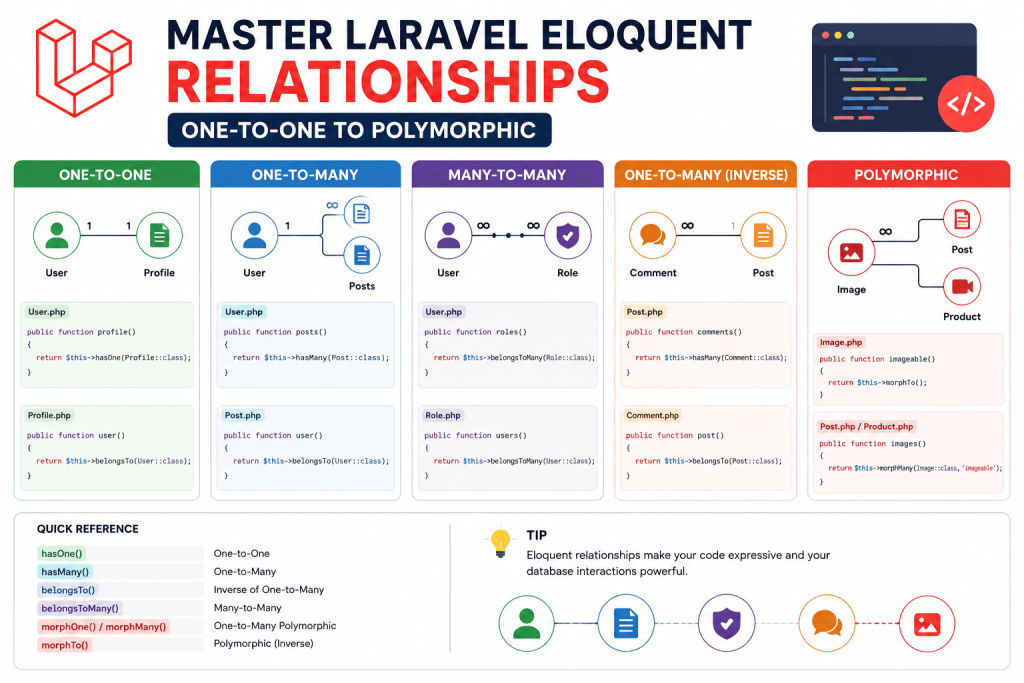
One-to-One: When Something Has Exactly One Related Thing
Every author on that content platform needed a profile, bio, social links, profile picture. One author, one profile. That’s a one-to-one relationship.
class Author extends Model
{
    public function profile()
    {
        return $this->hasOne(Profile::class);
    }
}

class Profile extends Model
{
    public function author()
    {
        return $this->belongsTo(Author::class);
    }
}
The profiles table needs an author_id column matching the author it belongs to.
$author = Author::find(1);
echo $author->profile->bio;
Simple enough, but here’s a mistake I made early in that project. I initially put the author’s profile fields directly on the authors table itself, name, bio, social links, everything in one place. It worked fine until the client wanted authors to optionally have a “guest contributor” mode with a much simpler, limited profile setup. Splitting profile data into its own separate table using this relationship made adding that variation way easier than it would’ve been with everything crammed into one table.
One-to-Many: When Something Has Several Related Things
Each author writes multiple posts. One author, many posts. This is the relationship I probably use the most across almost every project.
class Author extends Model
{
    public function posts()
    {
        return $this->hasMany(Post::class);
    }
}

class Post extends Model
{
    public function author()
    {
        return $this->belongsTo(Author::class);
    }
}
$author = Author::find(1);
$allPosts = $author->posts; // returns a collection of every post by this authorStraightforward, but worth mentioning a genuinely easy mistake to make here, forgetting the inverse relationship. I’ve caught myself defining hasMany on the Author model but forgetting belongsTo on the Post model, then wondering why $post->author returns null. Both directions need defining if you want to access the relationship from either side.
Many-to-Many: When Things Relate to Multiple Things, Both Ways
Posts on that platform needed tags, and tags obviously get reused across many different posts. A post can have multiple tags, and a tag can belong to multiple posts. That’s many-to-many.
This one needs a pivot table, which I completely forgot to set up the first time I tried this relationship years ago, then wondered why Eloquent kept throwing errors about a missing table.
php artisan make:migration create_post_tag_tableSchema::create('post_tag', function (Blueprint $table) {
$table->foreignId('post_id')->constrained()->onDelete('cascade');
$table->foreignId('tag_id')->constrained()->onDelete('cascade');
});Note the table name, post_tag, alphabetical order of the two related model names, singular. Eloquent expects this naming convention by default unless you specify otherwise, and getting this wrong (I named mine posts_tags once by mistake) causes a confusing “table not found” error that doesn’t immediately tell you the actual issue is just a naming mismatch.
class Post extends Model
{
    public function tags()
    {
        return $this->belongsToMany(Tag::class);
    }
}

class Tag extends Model
{
    public function posts()
    {
        return $this->belongsToMany(Post::class);
    }
}
Attaching tags to a post:
$post = Post::find(1);
$post->tags()->attach([1, 3, 5]); // attach tag IDs
Or syncing, which I actually use more often than attach() since it replaces the entire set instead of adding on top of what’s already there:
$post->tags()->sync([1, 3, 5]);I made a genuinely confusing mistake once using attach() inside an edit form, where updating a post’s tags kept adding duplicates every time someone hit save, instead of replacing the previous selection. Switching to sync() fixed it immediately, since that’s specifically built for exactly this “replace the whole set” scenario.
Has-Many-Through: The One I Rarely Need But Genuinely Useful Once
This relationship type confused me for the longest time before I actually had a real use case for it. On the content platform, each podcast episode belonged to a specific show, and each show belonged to an author. I needed a way to get all episodes by a specific author, without episodes directly storing an author_id themselves, since episodes only knew about their show, not the author directly.
class Author extends Model
{
    public function episodes()
    {
        return $this->hasManyThrough(Episode::class, Show::class);
    }
}
$author = Author::find(1);
$allEpisodes = $author->episodes; // gets episodes through the shows table, without needing a direct author_id on episodesThis saved me from either adding a redundant author_id column directly onto episodes (which would’ve required keeping it in sync manually whenever a show’s author changed) or writing an awkward manual join query. Honestly, I’ve only used this relationship type maybe three times total across all my projects, but on the rare occasion it fits, it’s genuinely the cleanest solution available.
Polymorphic Relationships: Where It Finally Clicked For Me
This was the relationship type that actually broke my brain a little the first time I tried understanding it from documentation alone. It only made real sense once I had an actual practical need for it.
On the content platform, comments needed to work on posts, videos, AND podcast episodes, three completely different models, but using one single comments system instead of building three separate, nearly identical comment tables.
Polymorphic relationships let one model belong to more than one other type of model, using a shared table with a bit of extra metadata tracking which type it’s actually related to.
php artisan make:migration create_comments_tableSchema::create('comments', function (Blueprint $table) {
$table->id();
$table->text('body');
$table->morphs('commentable'); // adds commentable_id and commentable_type columns
$table->timestamps();
});That morphs('commentable') line is doing a lot of quiet work, it creates two columns, commentable_id (which record this comment belongs to) and commentable_type (which model type that record actually is, Post, Video, or Episode).
class Comment extends Model
{
    public function commentable()
    {
        return $this->morphTo();
    }
}

class Post extends Model
{
    public function comments()
    {
        return $this->morphMany(Comment::class, 'commentable');
    }
}

class Video extends Model
{
    public function comments()
    {
        return $this->morphMany(Comment::class, 'commentable');
    }
}

class Episode extends Model
{
    public function comments()
    {
        return $this->morphMany(Comment::class, 'commentable');
    }
}
Adding a comment to any of these three, exactly the same way:
$post->comments()->create(['body' => 'Great article!']);
$video->comments()->create(['body' => 'Loved this episode!']);
And retrieving them, also identical regardless of which type it’s attached to:
$post->comments;
$video->comments;
The first time this actually worked correctly for me, comments seamlessly working across three completely different model types using one shared table and one shared Comment model, genuinely felt like a small revelation. I’d been mentally preparing to build three separate near-duplicate comment systems before understanding this properly.
A Mistake That Cost Me a Confusing Afternoon With Polymorphic Relationships
Here’s something that genuinely tripped me up. I renamed the Video model to MediaVideo later in the project for clarity, without realizing existing comments in the database still referenced the old App\Models\Video string in their commentable_type column. Suddenly, old comments on videos stopped showing up at all, no errors, they just silently returned empty.
Laravel stores the actual full class name string in that commentable_type column by default, so renaming a model breaks that link for any existing records unless you handle it. The fix, going forward, is defining explicit morph map aliases instead of relying on raw class names:
// In a service provider's boot method
use Illuminate\Database\Eloquent\Relations\Relation;

Relation::morphMap([
    'post' => Post::class,
    'video' => MediaVideo::class,
    'episode' => Episode::class,
]);
This stores a simple string alias (post, video, episode) instead of the full class path, meaning you can rename or reorganize your models later without breaking existing polymorphic relationships in your database. I set this up on every project using polymorphic relationships now, from the very start, specifically because of that confusing afternoon spent figuring out why old comments had vanished.
Real Use Cases Beyond That One Project
Since learning these properly, I’ve reused each relationship type across different projects:
- One-to-one: A user’s account settings, separate from their main profile table, on a SaaS dashboard project
- One-to-many: A restaurant’s menu items belonging to a specific restaurant, on a food ordering app
- Many-to-many: Students enrolled in multiple courses, and courses having multiple students, for a small tutoring center’s portal
- Has-many-through: Getting all reviews for a specific brand through its products, on a small e-commerce site
- Polymorphic: Likes working across both posts and comments using one shared likes table, on a community forum project
Common Mistakes I’d Warn You About
Forgetting the inverse relationship. Define both directions if you need to access the relationship from either model.
Wrong pivot table naming for many-to-many. Stick to Laravel’s convention (alphabetical, singular, underscore-separated) unless you explicitly specify a custom table name in your relationship definition.
Using attach() when you actually need sync(). If you’re replacing a full set of related records (like updating tag selections on an edit form), sync() avoids duplicate entries that attach() would otherwise create.
Not setting up morph maps before using polymorphic relationships in production. Renaming models later breaks existing polymorphic data unless you’ve defined explicit aliases from the start.
Over-using polymorphic relationships where a simpler relationship would work. I’ve seen projects (and been tempted myself) to reach for polymorphic relationships just because they feel more “flexible,” even when there’s genuinely only ever going to be one related model type. Keep it simple unless you actually need that flexibility.
Final Thoughts
Relationships are genuinely one of the most useful parts of Eloquent, but they only really click once you’ve got an actual real project forcing you to use each type properly, not just reading through definitions in documentation. Looking back, that content platform project, messy and confusing as it felt halfway through, is honestly what taught me more about Eloquent relationships than any tutorial had up to that point.
If you’re still mentally reaching for manual joins and foreign keys out of habit like I used to, try rebuilding one small part of an existing project using proper Eloquent relationships instead. It’s the kind of thing that feels abstract until you’ve actually done it once on something real, and then it just becomes the obvious way to structure things going forward.