

Our Activity Logs Table Hit 40 Million Rows, and Regular Indexing Wasn’t Cutting It Anymore
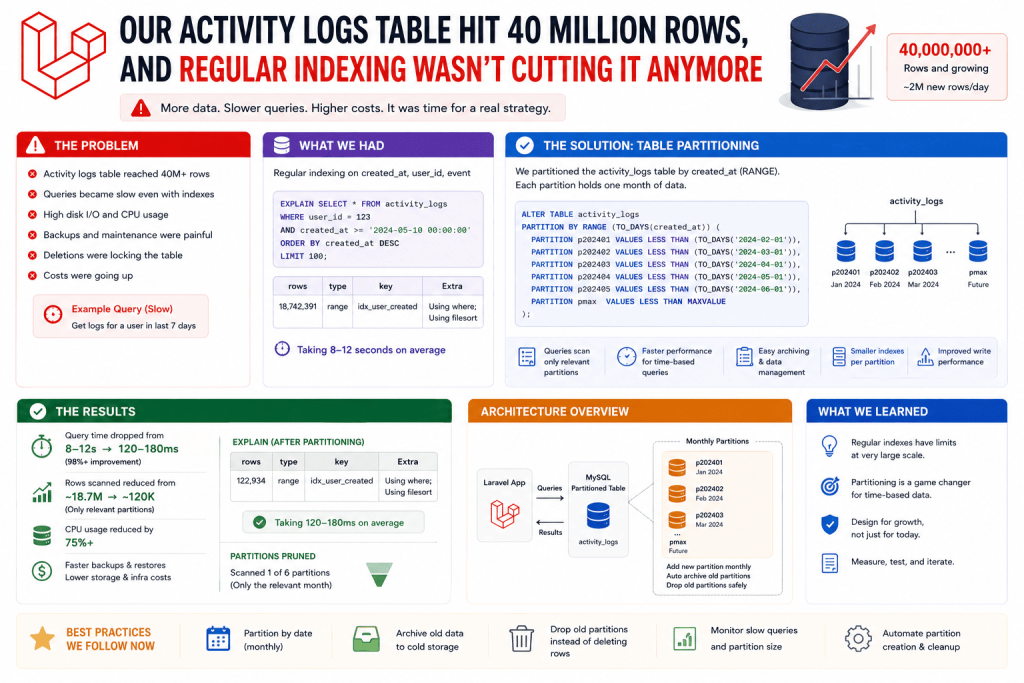
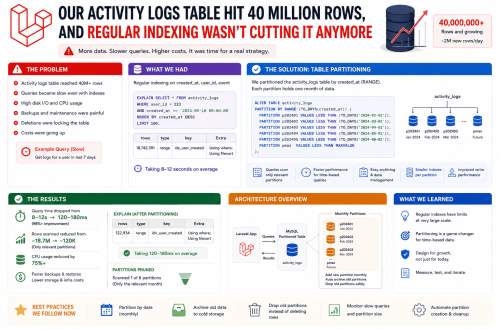
A SaaS product I helped maintain, a small team collaboration tool, had an activity log feature, every action a user took, comments, file uploads, task updates, got logged for an audit trail feature clients genuinely relied on. Reasonable feature. Except after about two years of steady growth across several hundred client companies, that single activity_logs table had grown to roughly 40 million rows.
Queries against it, even simple ones filtered by date range for a specific client, had gotten noticeably slow, several seconds for what used to be instant. I’d already added the right indexes, following exactly the same approach that fixed a similar slowdown on a different job board project. This time, indexing alone genuinely wasn’t enough, the table itself had just gotten too large for a single, undivided structure to handle efficiently regardless of indexing.
That’s what pushed me into actually learning about partitioning and, on a different but related project, sharding, properly, not just as abstract database concepts, but as genuine solutions to genuine problems at genuine scale. I want to be upfront from the start though, these are heavier, more involved techniques than most projects will ever actually need, and I want to be honest about that rather than making this sound like something every Laravel app should rush into.
Partitioning vs Sharding, The Actual Difference
These get used somewhat interchangeably sometimes, but they’re genuinely different approaches solving somewhat different problems.
Partitioning splits ONE large table into smaller physical pieces, still within the same database, based on some logical rule, usually a date range or a specific column’s value. The database handles routing queries to the right partition automatically, mostly transparent to your application code.
Sharding splits your data across entirely separate databases, sometimes on completely separate servers, usually based on something like a tenant ID or customer ID. Unlike partitioning, sharding genuinely does require your application to know which shard to talk to, it’s not automatically transparent the same way.
For the activity logs problem specifically, partitioning was the right fit, since it was one enormous table needing to be broken down logically, not genuinely separate databases needing splitting apart.
Step 1: Setting Up Date-Range Partitioning for the Activity Logs Table
MySQL supports partitioning natively, and since activity logs are almost always queried by a relevant date range (client wanting to see “activity from the last 30 days,” for example), partitioning by month made logical sense for how the data actually got queried.
This isn’t something Laravel’s migration system handles natively out of the box, so I wrote the actual partitioning setup using raw SQL within a migration:
public function up()
{
    DB::statement("
        ALTER TABLE activity_logs
        PARTITION BY RANGE (TO_DAYS(created_at)) (
            PARTITION p_2024_01 VALUES LESS THAN (TO_DAYS('2024-02-01')),
            PARTITION p_2024_02 VALUES LESS THAN (TO_DAYS('2024-03-01')),
            PARTITION p_2024_03 VALUES LESS THAN (TO_DAYS('2024-04-01')),
            PARTITION p_future VALUES LESS THAN MAXVALUE
        )
    ");
}
Each partition holds only the rows falling within that specific date range. When a query includes a WHERE created_at condition matching a specific range, MySQL can skip entirely irrelevant partitions completely, rather than scanning through all 40 million rows regardless of the actual date range being requested.
That p_future partition acts as a catch-all for anything beyond the ranges you’ve explicitly defined, genuinely important since without it, inserting a row with a date beyond your defined partitions would just fail outright.
Step 2: Actually Maintaining Partitions Going Forward (The Part I Initially Forgot)
Here’s a genuinely important lesson I learned the hard way. Partitioning by month isn’t a “set it up once and forget it” situation. New months keep happening, obviously, and that p_future catch-all partition, if left unmanaged, just keeps growing indefinitely, eventually defeating the entire purpose of partitioning by date in the first place.
I set up a scheduled Laravel command that runs monthly, automatically creating a new partition for the upcoming month:
// A custom artisan command, scheduled monthly
public function handle()
{
    $nextMonth = now()->addMonth()->format('Y_m');
    $nextMonthStart = now()->addMonths(2)->startOfMonth()->format('Y-m-d');

    DB::statement("
        ALTER TABLE activity_logs
        REORGANIZE PARTITION p_future INTO (
            PARTITION p_{$nextMonth} VALUES LESS THAN (TO_DAYS('{$nextMonthStart}')),
            PARTITION p_future VALUES LESS THAN MAXVALUE
        )
    ");
}
Schedule::command('logs:create-partition')->monthly();
I genuinely didn’t set this up initially, assuming the partitioning itself was a one-time fix. About four months later, checking on things again, I realized every new row since setup had just been quietly accumulating in that same catch-all p_future partition the entire time, since I’d never actually created new dated partitions to catch them properly. The fix worked correctly once implemented, I just hadn’t implemented the ongoing maintenance piece from the start, which somewhat defeated the point for those first few months.
Step 3: Querying Partitioned Tables (Mostly Business as Usual)
The genuinely nice part about partitioning is that your actual Eloquent queries don’t need to change at all:
$recentLogs = ActivityLog::where('client_id', $clientId)
    ->whereBetween('created_at', [now()->subDays(30), now()])
    ->get();
MySQL automatically figures out which partitions are relevant based on that created_at condition and only scans those, without your Laravel code needing any special awareness that partitioning exists at all underneath. This is genuinely the appeal of partitioning specifically, compared to sharding, which does require your application to be aware of where data lives.
Step 4: A Genuinely Different Problem, Sharding a Multi-Tenant SaaS by Customer
On a completely different, larger project, a project management SaaS with several genuinely large enterprise clients, some clients had databases far bigger and busier than others, and putting every single client’s data in one shared database started causing one client’s heavy usage to occasionally slow down performance for smaller, unrelated clients sharing that same database server.
This is where actual sharding came in, not partitioning within one database, but splitting entirely separate large clients onto their own dedicated database connections.
// config/database.php
'connections' => [
    'tenant_shard_1' => [
        'driver' => 'mysql',
        'host' => env('SHARD_1_HOST'),
        'database' => env('SHARD_1_DATABASE'),
        // ...
    ],
    'tenant_shard_2' => [
        'driver' => 'mysql',
        'host' => env('SHARD_2_HOST'),
        'database' => env('SHARD_2_DATABASE'),
        // ...
    ],
],
Then, a lookup table (kept in the main, shared database) mapping which client belongs to which shard:
class TenantShardMap extends Model
{
    // Lives in the main database, mapping tenant_id to a specific shard connection name
}
public function getConnectionForTenant($tenantId)
{
    $shardMap = TenantShardMap::where('tenant_id', $tenantId)->first();
    return $shardMap->connection_name ?? 'mysql'; // default shared connection for smaller clients
}
Then dynamically setting the connection for that specific request based on the logged-in user’s tenant:
$connectionName = $this->getConnectionForTenant($tenant->id);
$projects = Project::on($connectionName)->get();
Step 5: Being Honest About Why This Is Genuinely More Complicated Than It Sounds
I want to be upfront here, sharding added real, ongoing complexity to that SaaS project. Every single query needing awareness of which shard to use, migrations needing to run against multiple databases consistently, backups needing to happen per shard rather than once centrally, and moving a growing smaller client onto its own dedicated shard later required an actual, genuinely careful data migration process, not just a config change.
We only actually did this for a small handful of our largest, heaviest-usage clients, maybe four or five out of several hundred total. Every other, smaller client stayed on the shared default database without any issue at all, since they genuinely didn’t generate enough load to justify this added complexity.
This is honestly the most important thing I’d want anyone reading this to take away, sharding is a genuinely heavy, complex solution that solves a genuinely specific problem, uneven load from a small number of disproportionately large tenants. It is not something most Laravel projects, even fairly successful ones, actually need.
Step 6: What I’d Actually Recommend Trying First, Before Reaching for Either
Before considering partitioning or sharding, I’d genuinely recommend exhausting these first, since they solve a huge percentage of performance problems without nearly this level of added complexity:
- Proper indexing on frequently queried columns, which alone fixed the job board project I worked on previously without needing anything this involved
- Archiving genuinely old data to a separate, less frequently accessed table, rather than keeping everything in one live table indefinitely
- Read replicas, directing heavy reporting queries to a separate replica database, keeping your primary database focused on regular application traffic
- Caching frequently accessed, rarely changing data using Redis or Laravel’s cache system, reducing how often you even need to hit the database at all for certain queries
For the activity logs situation specifically, partitioning was genuinely the right call since the core problem was one table’s sheer size affecting query performance across an entire date range. For the multi-tenant SaaS situation, sharding was the right call only because a small handful of genuinely oversized clients needed complete isolation from smaller ones sharing the same server resources.
Common Mistakes I’d Warn You About
Reaching for sharding or partitioning before trying simpler fixes first. Indexing, archiving, and caching solve the vast majority of performance problems most projects will ever actually face.
Setting up date-range partitioning without an ongoing maintenance plan. New partitions need to keep getting created as time moves forward, or everything just piles back into one catch-all partition, defeating the entire purpose.
Underestimating how much sharding complicates migrations, backups, and general maintenance. Every one of these needs to now work correctly across multiple separate databases, not just one.
Sharding your entire user base when only a small handful of unusually large clients actually need it. We kept the vast majority of clients on a shared database and only sharded a genuinely small number of outliers, which kept overall complexity far more manageable than sharding everyone from the start.
Assuming these techniques are instantly reversible. Undoing partitioning or, especially, undoing sharding once data’s been split across separate databases, is a genuinely involved process, not a quick configuration rollback.
Final Thoughts
Both of these techniques solved genuinely real problems on genuinely real projects, but I’d be doing you a disservice if I made either sound like a casual weekend implementation. Partitioning that activity logs table was a few focused days of careful work plus ongoing monthly maintenance. Sharding that SaaS project’s largest clients took considerably longer, and added real, permanent complexity to how that entire system operates going forward.
If you’re facing genuine performance problems at genuine scale, millions of rows in one table for partitioning, or a small number of disproportionately large tenants for sharding, these are legitimate, well-established solutions worth learning properly. But please, genuinely exhaust indexing, archiving, caching, and read replicas first. Most Laravel projects, even fairly successful, actively used ones, will solve their actual performance problems with those simpler techniques long before ever genuinely needing to reach for partitioning or sharding at all.