
My Customer List Page Was Making 500+ Queries Just to Show “Last Order Date”
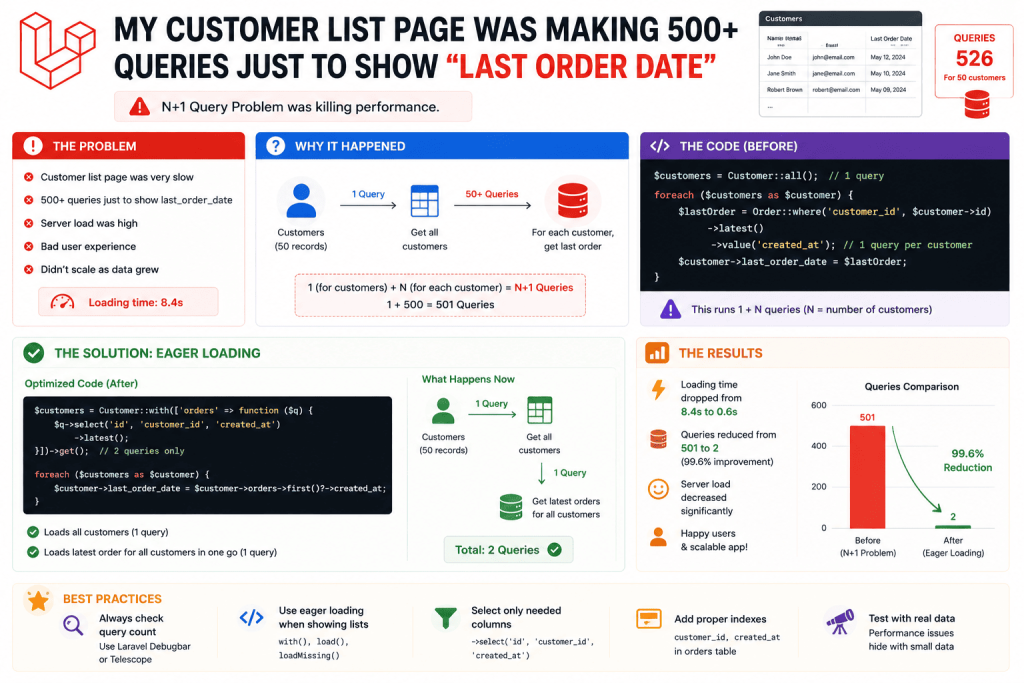
I built a customer list page for a small CRM project, showing each customer alongside their most recent order date, useful for a sales team wanting to see who hasn’t ordered in a while. Simple enough feature, except my first implementation looped through each customer and grabbed their latest order separately.
$customers = Customer::all();

foreach ($customers as $customer) {
    $lastOrder = $customer->orders()->latest()->first();
    echo $lastOrder?->created_at;
}
Classic N+1 problem, I know that pattern well by now from other projects. But eager loading the entire orders relationship felt wasteful too, since I genuinely only needed the single most recent date, not every order for every customer loaded into memory just to grab one value from each.
That’s exactly the situation where Eloquent’s subquery features, specifically addSelect() with a subquery, and whereExists(), turned out to be exactly what I needed. Once I actually understood how to use these properly, this entire category of “I need one specific related value per row” problem became genuinely easy to solve efficiently.
What a Subquery Actually Is (In Plain Terms)
A subquery is a query nested inside another query, MySQL runs the inner query as part of processing the outer one, often once per row being evaluated, but done efficiently at the database level rather than your application code manually looping and firing separate queries one at a time.
Instead of your PHP code asking “give me all customers” and then separately asking “what’s this customer’s last order” for each one individually, you ask the database a single, combined question, “give me all customers, and for each one, also tell me their last order date,” all in one trip to the database.
Step 1: Using addSelect() With a Subquery for “Last Order Date”
Here’s the actual fix I applied to the customer list page:
use Illuminate\Support\Facades\DB;

$customers = Customer::query()
    ->addSelect(['last_order_date' => Order::select('created_at')
        ->whereColumn('customer_id', 'customers.id')
        ->latest()
        ->limit(1)
    ])
    ->get();
Let me break down what’s actually happening here, since this confused me a bit the first time I tried writing it myself. The addSelect() method adds an extra calculated column to your main query’s results. Inside it, I’m defining a nested query on the Order model, specifically selecting just the created_at column, matching orders where customer_id equals the current customer’s id (that’s what whereColumn() does, comparing two columns against each other rather than comparing a column to a fixed value), ordering by most recent, and limiting to just one result.
foreach ($customers as $customer) {
    echo $customer->last_order_date;
}
This dropped the customer list page from over 500 queries (100 customers, each firing a separate query for their latest order) down to just a single query total. The page load time went from a genuinely embarrassing 3-4 seconds down to under 200 milliseconds.
Step 2: Handling Customers With No Orders At All
My first version of this had a small oversight, customers with zero orders showed last_order_date as null, which is technically correct, but I wanted the sales team to see something more explicitly readable, like “Never ordered” instead of just a blank space.
{{ $customer->last_order_date ? \Carbon\Carbon::parse($customer->last_order_date)->diffForHumans() : 'Never ordered' }}
Small addition, but it made a real difference in how usable the actual list felt for the sales team using it daily, rather than them wondering if a blank date meant something had actually broken.
Step 3: Using whereExists() to Filter Customers Who Have At Least One Order
A related feature request came in shortly after, the sales team wanted to filter the customer list to show ONLY customers who’d placed at least one order, filtering out leads who’d signed up but never actually purchased anything.
My first instinct was a join combined with distinct():
// My first attempt
$customersWithOrders = Customer::join('orders', 'orders.customer_id', '=', 'customers.id')
    ->select('customers.*')
    ->distinct()
    ->get();
This technically worked, but it felt a bit clunky, and I ran into a subtle issue, customers with multiple orders were still occasionally showing up as duplicated rows in certain edge cases depending on how I structured additional filters alongside this join, before the distinct() call properly deduplicated them. whereExists() turned out to be a genuinely cleaner, more directly expressive way to ask exactly the question I actually meant, “does at least one matching order exist for this customer,” without needing a join and manual deduplication at all:
$customersWithOrders = Customer::whereExists(function ($query) {
    $query->select(DB::raw(1))
        ->from('orders')
        ->whereColumn('orders.customer_id', 'customers.id');
})->get();
This reads almost like plain English once you get used to the syntax, “give me customers WHERE EXISTS at least one order WHERE that order’s customer_id matches this customer’s id.” No joins, no deduplication needed, no risk of duplicate rows sneaking in, since whereExists() is fundamentally just checking a true/false condition per row, not actually joining and multiplying rows together the way a regular join can under certain conditions.
Step 4: Combining Both Together for a Genuinely Useful Real Feature
The sales team’s actual final request combined both of these, show customers who have at least one order, along with each customer’s most recent order date, sorted so the customers who haven’t ordered in the longest time show up first, specifically to help sales prioritize who to follow up with.
$customers = Customer::query()
    ->whereExists(function ($query) {
        $query->select(DB::raw(1))
            ->from('orders')
            ->whereColumn('orders.customer_id', 'customers.id');
    })
    ->addSelect(['last_order_date' => Order::select('created_at')
        ->whereColumn('customer_id', 'customers.id')
        ->latest()
        ->limit(1)
    ])
    ->orderBy('last_order_date', 'asc')
    ->get();
That combination, filtering with whereExists() and simultaneously pulling a calculated value with addSelect(), all sorted by that same calculated value, genuinely felt like a small breakthrough moment for me once it actually worked correctly. It’s the kind of query that would’ve taken considerably more code, and performed noticeably worse, using loops and separate queries the way I’d been doing things before.
Step 5: A Mistake I Made With Ordering by a Subquery Column
Here’s something that actually confused me the first time I tried the orderBy('last_order_date', 'asc') line above. I initially wrote it before fully testing, assuming it would just work since last_order_date looked like a normal column from the query’s perspective. It did work, but I want to flag why, since it’s not immediately obvious, MySQL genuinely can sort by an aliased column defined through addSelect(), since by the time the ORDER BY clause is evaluated, that calculated value already exists as part of the result set. This isn’t true in every database system for every query structure, so I made sure to actually test this specific combination directly rather than assuming it would behave identically if I ever needed to port this logic to a different database engine down the line.
Step 6: Using whereExists() for a Negative Condition Too
A related feature I built shortly after used the opposite logic, finding customers who had NOT ordered anything in the last 90 days, specifically for a “win back” email campaign the marketing team wanted to run.
$inactiveCustomers = Customer::whereNotExists(function ($query) {
    $query->select(DB::raw(1))
        ->from('orders')
        ->whereColumn('orders.customer_id', 'customers.id')
        ->where('created_at', '>=', now()->subDays(90));
})->get();
whereNotExists() is the direct inverse, “give me customers where NO matching recent order exists.” Genuinely clean way to express exactly this kind of “hasn’t done X in Y days” condition, which comes up constantly in real business applications, way more often than I expected once I actually had this tool available to reach for.
Real Before and After Numbers
For context on the actual performance difference this made on the CRM project:
Before (looping and querying per customer): Around 500-600 queries for a list of 100-120 customers, page load consistently 3-4 seconds.
After (addSelect subquery combined with whereExists filtering): A single combined query, page load consistently under 250 milliseconds regardless of how many customers were being displayed.
That difference, going from several seconds down to a quarter of a second, made the sales team’s daily workflow genuinely smoother, since they’d previously been avoiding checking that page regularly purely because of how sluggish it felt.
Common Mistakes I’d Warn You About
Falling back to loops and separate queries out of habit. If you catch yourself writing a foreach loop that queries a relationship for each item, stop and consider whether addSelect() with a subquery could pull that same value in a single combined query instead.
Using a join with distinct() when whereExists() genuinely fits better. Joins can multiply rows in ways that require careful deduplication, especially once you add more conditions later. whereExists() avoids this entirely for simple “does at least one related record exist” checks.
Forgetting whereColumn() versus a regular where(). whereColumn() compares two columns against each other (like matching customer_id to customers.id), while a regular where() compares a column to a fixed value. Mixing these up by accident causes queries to either return nothing or return every single row incorrectly.
Not testing subquery-based sorting and filtering with realistic data volumes. Subqueries are generally efficient, but it’s still worth confirming performance holds up as your actual data grows, using EXPLAIN to double check MySQL is handling the subquery efficiently rather than assuming it automatically will regardless of scale.
Overcomplicating simple relationships that eager loading already handles fine. Not every related value needs a subquery. If you genuinely need the full related collection anyway elsewhere on the same page, regular eager loading with with() might still be the simpler, more appropriate choice.
Real Use Cases Beyond These Examples
Since properly learning these subquery techniques, I’ve used them for:
- Showing each product’s most recent review rating on a product listing page, without loading every single review for every product
- Filtering blog posts to only show ones that have at least one published comment, on a content moderation dashboard
- Finding gym members who haven’t checked in within the last 30 days, for an automated re-engagement email feature
Final Thoughts
That 500-query customer list page taught me something I keep rediscovering across different projects, whenever you need just one specific piece of related data per row, not the entire related collection, there’s almost always a more efficient way to ask the database for it directly, rather than looping through results in PHP and querying repeatedly. addSelect() with a subquery and whereExists() cover a genuinely huge chunk of these situations once you get comfortable reaching for them.
If you’ve got a page right now looping through results and querying a relationship for each one individually, it’s worth checking whether one of these two techniques could pull that exact same data in a single, much more efficient query instead. It’s the kind of change that feels like a small syntax adjustment but can turn a sluggish, query-heavy page into something that genuinely feels instant.