
Stock Was Updating Inconsistently Because I Copy-Pasted the Same Logic in Three Places
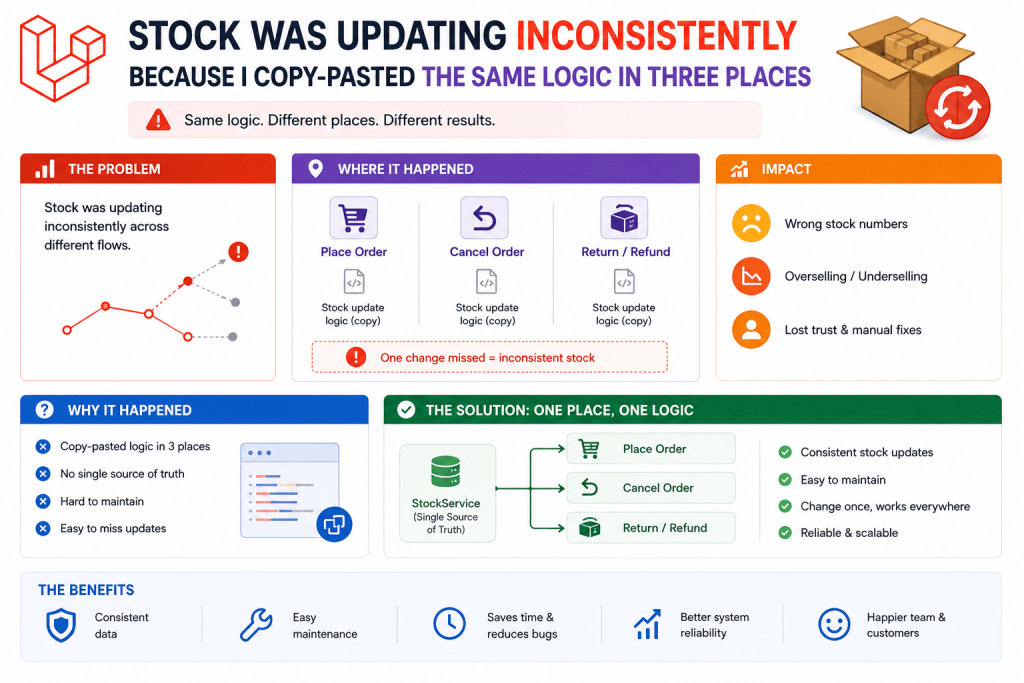
I was building an e-commerce platform for a small clothing brand, and stock deduction logic, subtract the ordered quantity whenever a new order comes in, existed in three completely separate places in my codebase. The regular checkout controller had it. The admin panel’s manual order creation feature had it. And a bit later, when the client wanted a basic API for a mobile app, I added it there too, copy-pasted from the checkout controller.
Then the admin logic got updated once for a specific edge case (allowing partial stock deduction for backordered items), and nobody remembered to update the other two copies. Suddenly, the mobile app orders were deducting stock differently than website orders, and one customer somehow managed to order more of an item than was actually in stock through the mobile app specifically, since that copy still had the old logic.
That’s when I actually learned about Laravel Observers properly, and moved that stock logic into one single, centralized place that runs automatically no matter how an order actually gets created. Been doing it that way ever since.
What Observers Actually Do (Explained Simply)
An Observer is basically a dedicated class that watches a specific model for certain events, created, updated, deleted, and automatically runs your code whenever those events happen, regardless of where in your app that event was actually triggered from.
Instead of remembering to manually call your stock-deduction logic every single place an order might get created, an Observer runs that logic automatically the moment any Order gets created, anywhere in your entire application, checkout, admin panel, API, artisan command, doesn’t matter.
Step 1: Generating an Observer
php artisan make:observer OrderObserver --model=Order
This creates a class in app/Observers with several empty methods already stubbed out for you, corresponding to different model events.
class OrderObserver
{
    public function created(Order $order)
    {
        //
    }

    public function updated(Order $order)
    {
        //
    }

    public function deleted(Order $order)
    {
        //
    }
}
Step 2: Moving the Stock Logic Into the Observer
Here’s what I moved into the created() method, consolidating what used to be three separate, slowly diverging copies of the same logic:
public function created(Order $order)
{
    foreach ($order->items as $item) {
        $product = Product::find($item->product_id);

        if ($product) {
            $product->decrement('stock_quantity', $item->quantity);
        }
    }
}
Now, whether an order gets created through the website checkout, the admin panel, or the mobile app’s API, this exact same logic runs automatically every single time, since it’s tied to the model’s created event itself, not to any specific controller that happens to create an order.
Step 3: Registering the Observer
This part actually tripped me up the first time, since creating the Observer class alone doesn’t do anything, you need to explicitly register it so Laravel actually knows to use it.
In Laravel 11 and 12, I register observers inside a service provider’s boot() method, usually AppServiceProvider for smaller projects, or a dedicated provider for bigger ones:
use App\Models\Order;
use App\Observers\OrderObserver;

public function boot()
{
    Order::observe(OrderObserver::class);
}
I genuinely spent about twenty confused minutes once wondering why my Observer’s code “wasn’t running” during initial testing, only to realize I’d created the class but completely forgotten this registration step. Worth double-checking this if your Observer seems to be doing nothing.
Step 4: A Genuinely Useful Real Example Beyond Stock
On a different project, a subscription-based membership site, I used an Observer to automatically send a welcome email and create a default settings record whenever a new user registered, regardless of whether they signed up through the normal registration form, an admin manually creating an account for them, or a bulk import script the client used for migrating existing members.
class UserObserver
{
    public function created(User $user)
    {
        UserSettings::create([
            'user_id' => $user->id,
            'notifications_enabled' => true,
            'theme' => 'light',
        ]);

        Mail::to($user->email)->queue(new WelcomeEmail($user));
    }
}
Before this, the bulk import script specifically had been skipping the welcome email and settings creation entirely, since whoever wrote that import script (a previous developer on the project) hadn’t known about, or hadn’t bothered replicating, the logic that existed in the normal registration controller. Moving it into an Observer meant it became genuinely impossible to forget, since it runs automatically regardless of which specific piece of code created that user.
Step 5: Handling the Updated Event (Where I Learned Something Important)
I wanted to log every time an order’s status changed, pending to processing to shipped, that kind of thing, for a basic audit trail feature the client requested.
public function updated(Order $order)
{
    if ($order->isDirty('status')) {
        OrderStatusLog::create([
            'order_id' => $order->id,
            'old_status' => $order->getOriginal('status'),
            'new_status' => $order->status,
        ]);
    }
}
That isDirty('status') check matters a lot here, and it’s something I initially left out, which caused a genuinely confusing bug. Without it, the updated() method fires for ANY change to an order, updating the shipping address, adding a note, anything at all, not just status changes specifically. My audit log ended up full of entries logging “status changed from shipped to shipped” purely because some completely unrelated field had been updated on the same order at the same time.
isDirty() checks whether a specific attribute actually changed during this particular save, letting you scope your Observer logic to only react to the specific change you actually care about, rather than firing for absolutely any update to the model.
Step 6: Being Careful About What NOT to Put in an Observer
Here’s a mistake I made on a different project that taught me observers aren’t always the right tool. I put an expensive, slow API call (checking a shipping carrier’s rate) inside an Order model’s created() observer method, assuming it made sense since it was technically related to order creation.
The problem was, this made every single order creation across the ENTIRE app noticeably slower, including places where that shipping rate check genuinely wasn’t needed at that exact moment, like when an admin manually created a test order for internal purposes.
I moved that specific logic out of the Observer and back into the actual checkout process directly, since it was really something specific to customer-facing checkout, not something that should apply universally to any and every order creation across the entire application regardless of context.
Lesson learned: Observers are great for logic that should genuinely apply universally, every single time this model event happens, no exceptions, in any context, like the stock deduction and welcome email examples. They’re not the right place for logic that’s actually specific to only certain scenarios or entry points, that kind of conditional, context-specific logic belongs in the actual controller or service class handling that specific scenario instead.
Step 7: Observers and Database Transactions Working Together
On the e-commerce project, once I’d combined Observers with database transactions (something I learned the importance of after a different, unrelated incident involving a customer’s wallet balance), I made sure the stock deduction inside the Observer would properly roll back if anything else in the same transaction failed:
DB::transaction(function () use ($orderData) {
    $order = Order::create($orderData); // triggers the observer's created() method automatically
    // If anything after this line throws an exception, the observer's stock deduction
    // rolls back too, since it happened within the same transaction
});
This worked out nicely without any extra effort on my part, since the Observer’s created() method runs within whatever transaction context the Order::create() call itself was made in. If the surrounding transaction rolls back, any database changes the Observer made roll back right along with it, keeping everything consistent.
Common Mistakes I’d Warn You About
Forgetting to actually register the Observer. Creating the class alone does nothing. It needs to be registered in a service provider’s boot() method.
Not using isDirty() when you only care about specific attribute changes. Without it, your Observer logic fires for literally any update to the model, not just the specific change you’re actually trying to react to.
Putting context-specific or slow logic inside an Observer that should apply universally. If the logic genuinely shouldn’t run in every single scenario where this model event happens, an Observer probably isn’t the right place for it.
Assuming Observers replace all validation or business logic entirely. Observers are great for side effects, things that should happen as a consequence of an event, not necessarily for core business logic that determines whether an action should be allowed to happen at all. Keep validation and authorization logic in your controllers or form requests, and use Observers for the “and then automatically do this too” part.
Not testing that Observer logic actually fires from every entry point you expect it to. I’d genuinely recommend testing your Observer by triggering the model event from each different place in your app, checkout, admin panel, any import scripts, an API endpoint, to confirm it actually runs consistently everywhere, rather than just assuming it does because it worked once in your primary testing flow.
Real Use Cases Beyond These Examples
Since properly learning Observers, I’ve used them for:
- Automatically generating a unique invoice number whenever a new invoice model is created, regardless of which part of the app created it
- Clearing a specific cache key automatically whenever a product’s price or stock changes, so cached product pages always reflect current data without manual cache-clearing calls scattered everywhere
- Automatically notifying a manager whenever an employee’s leave request status changes to approved or rejected, on an HR management tool
Final Thoughts
That inconsistent stock deduction bug taught me something that feels obvious in hindsight, if the exact same logic needs to run every single time a specific thing happens to a model, regardless of where that action gets triggered from, that logic probably shouldn’t live inside individual controllers at all. It should live somewhere centralized that runs automatically no matter what.
If you’ve got logic copy-pasted across multiple controllers or entry points right now, especially anything related to keeping data consistent whenever a model gets created, updated, or deleted, it’s worth pulling that into an Observer instead. It’s the kind of change that feels like a small refactor in the moment, but genuinely prevents the exact kind of “why is this behaving differently over here” confusion that cost me a confused, slightly embarrassing afternoon tracking down that original stock discrepancy.