
The Client Had a 10-Year-Old Inventory System I Wasn’t Allowed to Touch, So I Had to Connect Around It
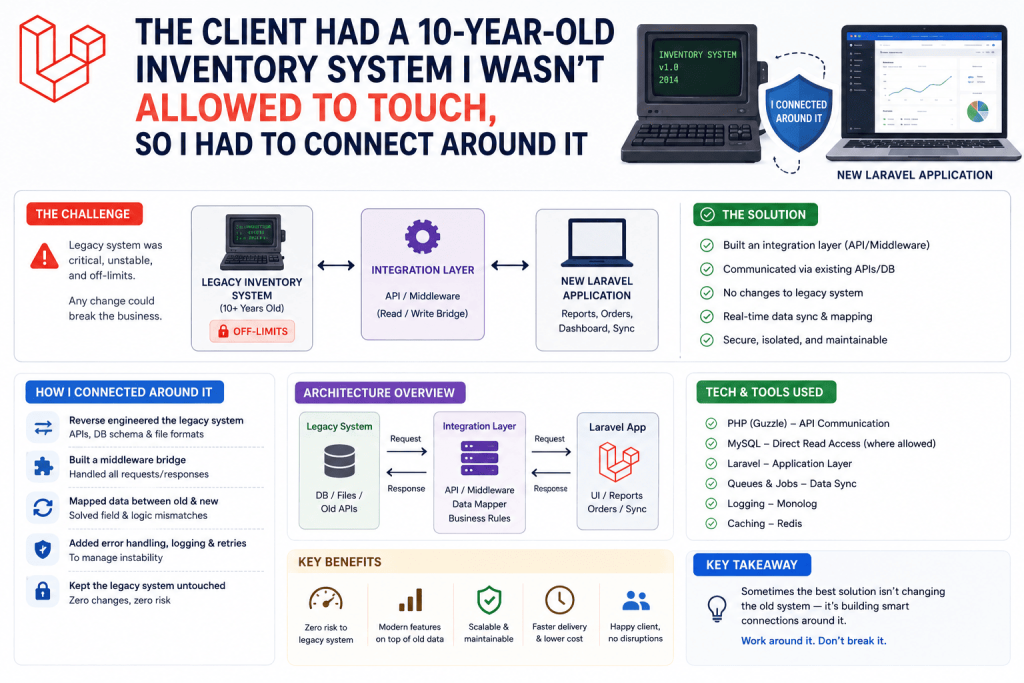
A wholesale distributor client wanted a modern reporting dashboard, sales trends, stock alerts, that kind of thing. Simple enough, except their actual inventory data lived in an old, fragile MySQL database powering a desktop inventory application from years ago, built by someone long gone, that the client absolutely did not want me touching or migrating in any way. “Don’t break that system, it runs our entire warehouse,” was basically the brief.
So the new Laravel reporting app needed its own database for things like user accounts, saved reports, and dashboard preferences, while also reading live data from that old, untouchable inventory database. Two databases, one Laravel application, reading from both without ever writing to the legacy one.
I’d never actually set this up properly before that project, and my first instinct, just switching the default database connection back and forth in code, turned out to be a genuinely bad approach. Here’s how I actually got this working cleanly, mistakes included.
Why You’d Even Need This Setup
Multiple database connections in one Laravel app come up more often than you’d think once you’re working with real client situations:
- Connecting to a legacy system you can’t or shouldn’t migrate, exactly my situation
- Multi-tenant applications where each client has a genuinely separate database for data isolation
- Splitting reads and writes across a primary and replica database for performance reasons
- Pulling data from a third-party or partner company’s database for reporting purposes
For the distributor project specifically, it was the legacy system scenario, read from theirs, read and write freely on my own.
Step 1: Configuring Multiple Connections in database.php
Laravel’s config/database.php already supports multiple named connections, you just need to actually define them, since by default only one (usually mysql) is set up out of the box.
'connections' => [

    'mysql' => [
        'driver' => 'mysql',
        'host' => env('DB_HOST', '127.0.0.1'),
        'port' => env('DB_PORT', '3306'),
        'database' => env('DB_DATABASE', 'forge'),
        'username' => env('DB_USERNAME', 'forge'),
        'password' => env('DB_PASSWORD', ''),
        // ... other default settings
    ],

    'legacy_inventory' => [
        'driver' => 'mysql',
        'host' => env('LEGACY_DB_HOST', '127.0.0.1'),
        'port' => env('LEGACY_DB_PORT', '3306'),
        'database' => env('LEGACY_DB_DATABASE', 'old_inventory'),
        'username' => env('LEGACY_DB_USERNAME', 'forge'),
        'password' => env('LEGACY_DB_PASSWORD', ''),
        'charset' => 'utf8mb4',
        'collation' => 'utf8mb4_unicode_ci',
        'prefix' => '',
        'strict' => false, // the legacy system's data didn't follow strict mode conventions
    ],

],
Note that strict => false on the legacy connection specifically. The old inventory system’s database had some genuinely questionable data, empty strings where numbers should be, dates stored inconsistently, that kind of thing accumulated over a decade of an older application handling data a bit loosely. Laravel’s strict mode would’ve thrown errors trying to read some of that data properly, so I relaxed it specifically for this connection while keeping the main app’s own database in strict mode as normal.
Add the corresponding environment variables to your .env file:
LEGACY_DB_HOST=192.168.1.50
LEGACY_DB_PORT=3306
LEGACY_DB_DATABASE=old_inventory
LEGACY_DB_USERNAME=reporting_readonly
LEGACY_DB_PASSWORD=your_actual_password
That username, reporting_readonly, is actually an important detail I’ll get back to shortly.
Step 2: Actually Using the Secondary Connection
Once configured, using a specific connection for a query is straightforward using Laravel’s query builder directly:
$stockLevels = DB::connection('legacy_inventory')
    ->table('stock')
    ->where('quantity', '<', 10)
    ->get();
That connection('legacy_inventory') call tells Laravel exactly which database configuration to use for this specific query, completely separate from your app’s default connection.
Step 3: Using Eloquent Models With a Specific Connection
Since the legacy inventory data needed more involved handling in the reporting dashboard, not just raw queries, I built proper Eloquent models for it too, just pointing them at the correct connection:
class LegacyStock extends Model
{
    protected $connection = 'legacy_inventory';
    protected $table = 'stock';
    public $timestamps = false; // the old system didn't use Laravel-style timestamps
}
That public $timestamps = false line mattered here too, since the old database’s tables didn’t have created_at and updated_at columns the way Laravel expects by default. Forgetting this caused Eloquent to try updating a updated_at column that didn’t exist, throwing a confusing SQL error the first time I tested a simple update, before I remembered this system predated any of these Laravel conventions entirely.
$lowStockItems = LegacyStock::where('quantity', '<', 10)->get();
This model behaves almost exactly like any other Eloquent model, except it’s quietly pointing at a completely different database the whole time.
Step 4: Making Absolutely Sure You Can’t Accidentally Write to the Legacy System
Here’s where I got genuinely cautious, since the client’s one real requirement was never touching that legacy database’s data. Even with good intentions, it’s easy to accidentally write to a connection you meant to only read from, especially months later when you’ve forgotten the original context of why a specific model exists.
My actual safety net was at the database level itself, not just relying on careful coding habits. I asked the client’s IT contact to create a dedicated MySQL user account with read-only permissions specifically for this reporting connection:
CREATE USER 'reporting_readonly'@'%' IDENTIFIED BY 'a_genuinely_strong_password';
GRANT SELECT ON old_inventory.* TO 'reporting_readonly'@'%';
FLUSH PRIVILEGES;
This meant even if I, or anyone working on this project after me, accidentally wrote code attempting to insert or update something on that legacy connection, MySQL itself would reject it outright with a permissions error, regardless of what the Laravel code tried to do. This felt like the genuinely responsible way to handle this specific situation, not relying purely on remembering “don’t write to this one” as a mental note that could easily get forgotten or overlooked by someone else touching the codebase later.
I’d genuinely recommend this approach for any similar situation, don’t rely solely on application-level discipline for something this important, enforce it at the actual database permission level too.
Step 5: Handling Relationships Across Two Different Databases
This is where things got a bit trickier. The reporting dashboard needed to show which of the new app’s saved “watchlist” items corresponded to specific legacy stock items, meaning I needed some kind of relationship spanning both databases.
Eloquent relationships don’t work directly across different database connections the same way they do within one connection, you can’t just define a normal belongsTo() expecting it to automatically query across two separate database servers seamlessly.
My actual solution was simpler than trying to force a cross-database Eloquent relationship, I stored the legacy system’s stock ID as a plain reference value in my own app’s watchlist_items table, then manually looked up the corresponding legacy record when needed:
class WatchlistItem extends Model
{
    // Uses default connection, this app's own database

    public function legacyStock()
    {
        return LegacyStock::on('legacy_inventory')->find($this->legacy_stock_id);
    }
}
Not a true Eloquent relationship in the traditional sense, more of a helper method manually fetching related data from the other connection when actually needed. It’s a bit less elegant than a genuine relationship, but it’s honestly the most straightforward, least fragile way to bridge two genuinely separate databases without overcomplicating things.
Step 6: Watching Out for Performance With Cross-Database Lookups
Since these aren’t genuine joined queries at the database level (you can’t efficiently join across two entirely separate database connections), looping through a list and looking up legacy data individually for each item can quietly reintroduce the exact N+1 query problem I’ve dealt with plenty of times on single-database projects.
// Watch out for this exact pattern
foreach ($watchlistItems as $item) {
    echo $item->legacyStock()->quantity; // separate query per item, against a different connection entirely
}
For the distributor’s dashboard, once the watchlist grew to showing 50+ items, this caused a noticeable slowdown, similar in spirit to a normal N+1 problem, just spread across two databases instead of one. The fix was batching the legacy lookups into a single query instead of one per item:
$legacyIds = $watchlistItems->pluck('legacy_stock_id');

$legacyStockData = LegacyStock::whereIn('id', $legacyIds)->get()->keyBy('id');

foreach ($watchlistItems as $item) {
    $stock = $legacyStockData->get($item->legacy_stock_id);
    echo $stock->quantity ?? 'Unknown';
}
This dropped it back down to just one additional query against the legacy database total, regardless of how many watchlist items were being displayed, instead of one per item.
Real Use Cases Beyond This Project
Since setting this up properly, I’ve used the same multiple-connection approach for:
- A franchise business’s central reporting app pulling sales data from each individual location’s own separate database
- A migration project where the new app ran alongside the old system temporarily during a gradual transition period, reading from both while data slowly moved over
- A read replica setup on a higher-traffic project, directing heavy reporting queries to a replica database specifically to avoid slowing down the main production database handling live customer traffic
Common Mistakes I’d Warn You About
Relying only on careful coding to avoid writing to a read-only source. Enforce it at the actual database permission level too, as I did with the read-only MySQL user, since code discipline alone isn’t a reliable long-term safety net, especially once other developers touch the project later.
Forgetting $timestamps = false on models pointing to older systems that predate Laravel conventions. This caused a confusing error for me the first time, trying to update a updated_at column that simply didn’t exist in that legacy table structure.
Assuming Eloquent relationships work seamlessly across separate database connections. They genuinely don’t, in the traditional sense. Plan for manual lookups or helper methods bridging the two instead.
Not batching cross-database lookups. Looping and querying the second connection individually per item reintroduces N+1-style performance problems, just across two databases instead of one.
Not double-checking connection settings match the legacy system’s actual quirks. Strict mode, charset settings, and collation can all cause confusing errors if they don’t match how the older database was actually originally set up.
Final Thoughts
Connecting to multiple databases in one Laravel app felt intimidating going into that distributor project, mostly because I’d never actually needed to before. In practice, once I understood Laravel’s connection configuration was already built for exactly this scenario, it came together a lot more smoothly than expected, the real complexity ended up being more about respecting the legacy system’s quirks and limitations than anything genuinely difficult on the Laravel side.
If you’re facing something similar right now, an old system you can’t touch, a multi-tenant setup, or splitting reads and writes across databases, start with the connection configuration first, get read access working safely and confirmed read-only at the permission level, then build your actual reporting or integration logic around that solid foundation.