
An Admin Accidentally Deleted a Customer’s Entire Order History, and I Had No Way to Get It Back
I got a panicked WhatsApp message from a client at 9pm, one of their staff members had clicked “delete” on a customer record in the admin panel I’d built, thinking it would just archive it. It didn’t archive anything. It permanently removed the customer and, because of a cascading foreign key, every single order tied to that customer too. Gone. No backup taken that day, no recovery option, nothing.
I felt genuinely sick for about ten minutes. We ended up manually reconstructing what we could from old email confirmations and payment gateway records, but it was a messy, stressful evening that absolutely didn’t need to happen.
The very next morning, I went through every single “delete” button across every project I’d built and replaced hard deletes with soft deletes wherever it made sense. If you’ve never dealt with this exact panic yourself, let me save you from learning it the hard way.
What Soft Deleting Actually Means
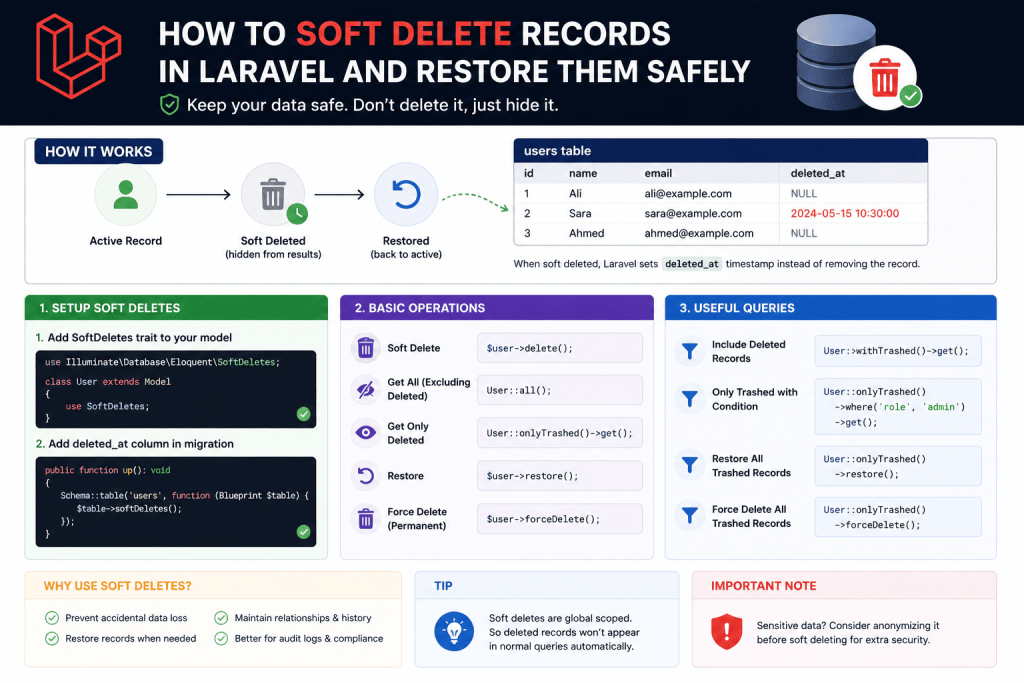
Instead of actually removing a row from the database when someone clicks delete, soft deleting just marks that row as deleted using a timestamp column, while the actual data stays completely intact in the database. Your app then automatically hides “deleted” records from normal queries, so it looks and behaves exactly like the record is gone, but it’s genuinely still there, recoverable, if you ever need it back.
Laravel makes this remarkably easy to implement, which honestly made me feel a little foolish for not having set it up from the start on that client’s project.
Step 1: Adding the Deleted At Column
First, add a deleted_at column to whatever table needs soft deleting, in this case, the customers table.
php artisan make:migration add_deleted_at_to_customers_table
public function up()
{
    Schema::table('customers', function (Blueprint $table) {
        $table->softDeletes();
    });
}

public function down()
{
    Schema::table('customers', function (Blueprint $table) {
        $table->dropSoftDeletes();
    });
}
softDeletes() is a handy shortcut that just adds a nullable deleted_at timestamp column. That’s genuinely the entire database change needed.
Step 2: Adding the Trait to Your Model
use Illuminate\Database\Eloquent\SoftDeletes;

class Customer extends Model
{
    use SoftDeletes;
}
One line. That’s it. Once this trait is added, calling $customer->delete() no longer actually removes the row, it just sets deleted_at to the current timestamp instead.
$customer = Customer::find(1);
$customer->delete();

// Customer still exists in database, deleted_at is now set
// Customer::find(1) will now return null, since Laravel automatically excludes soft-deleted records from normal queries
This is exactly the behavior I needed, from the admin’s perspective, clicking delete still makes the customer disappear from the list immediately, functionally identical to before. But behind the scenes, nothing’s actually gone.
Step 3: Restoring a Soft-Deleted Record
This is the part that would’ve saved that entire stressful evening if it had been in place. To bring back a soft-deleted record:
$customer = Customer::withTrashed()->find(1);
$customer->restore();
withTrashed() tells Eloquent to include soft-deleted records in this query, since normal queries automatically exclude them. Once you’ve found the record this way, restore() simply clears the deleted_at timestamp, making it fully active again, exactly as it was.
I actually built a small “Recently Deleted” section into that client’s admin panel afterward, specifically so staff could see and restore accidentally deleted records themselves without needing to call me in a panic:
public function trashed()
{
    $deletedCustomers = Customer::onlyTrashed()->get();
    return view('admin.customers.trashed', compact('deletedCustomers'));
}

public function restore($id)
{
    $customer = Customer::withTrashed()->findOrFail($id);
    $customer->restore();
    return back()->with('success', 'Customer restored successfully.');
}
onlyTrashed() specifically shows ONLY soft-deleted records, useful for building exactly this kind of “trash bin” style view. This one addition alone has saved multiple clients since from that exact same panic, since now staff can just undo their own mistake in seconds instead of it becoming an emergency phone call.
Step 4: Permanently Deleting When You Actually Mean It
Soft deleting doesn’t mean records live forever. Sometimes you genuinely do want to permanently remove something, GDPR-related data deletion requests being one legitimate real reason I’ve had to deal with on a project handling EU customers.
$customer = Customer::withTrashed()->find(1);
$customer->forceDelete();
forceDelete() bypasses the soft delete behavior entirely and genuinely removes the row permanently. I make sure this specific action always has an extra confirmation step in any admin panel I build, usually requiring the admin to type the customer’s name to confirm, specifically because this one’s actually irreversible, unlike the regular soft delete.
Step 5: Handling Relationships Properly (Where I Got Something Wrong Initially)
Here’s a mistake I made on a different project after implementing soft deletes. I had orders belonging to customers, and I’d set up the foreign key with onDelete('cascade'), assuming that only mattered for hard deletes.
Schema::table('orders', function (Blueprint $table) {
    $table->foreignId('customer_id')->constrained()->onDelete('cascade');
});
Since soft deleting doesn’t actually run a real SQL DELETE statement, this cascade rule never actually triggers for soft deletes, it only applies to genuine hard deletes. This meant when I soft-deleted a customer, their orders stayed completely untouched and still visible, which actually caused a different confusing issue, staff could still see and interact with orders belonging to a customer that appeared “deleted” from the customer list.
The fix was handling this relationship manually in the model itself, using Eloquent’s model events:
class Customer extends Model
{
    use SoftDeletes;

    protected static function booted()
    {
        static::deleting(function ($customer) {
            $customer->orders()->delete(); // soft deletes related orders too
        });

        static::restoring(function ($customer) {
            $customer->orders()->restore(); // restores related orders too
        });
    }
}
This ensures that soft-deleting a customer also soft-deletes their orders, and restoring a customer brings their orders back along with them, keeping everything logically consistent instead of leaving orphaned or inconsistently visible related records floating around.
Step 6: Showing Deleted Records Alongside Active Ones When Needed
Sometimes you want to see everything, active and deleted, together, for reporting or audit purposes.
$allCustomers = Customer::withTrashed()->get();
This includes soft-deleted records without permanently altering their status. Useful for something like a monthly report showing total customer activity including churned or removed customers, without needing to restore anything just to see that historical data.
A Genuinely Useful Pattern: Showing “Deleted X Days Ago”
Since deleted_at is just a regular timestamp, you can use it for something nice in an admin trash view, showing exactly how long ago something was deleted:
protected function deletedAgo(): Attribute
{
    return Attribute::make(
        get: fn () => $this->deleted_at?->diffForHumans(),
    );
}
@foreach ($deletedCustomers as $customer)
    <p>{{ $customer->name }} - deleted {{ $customer->deleted_ago }}</p>
@endforeach
Small addition, but it makes a “Recently Deleted” section feel a lot more informative for whoever’s reviewing it, rather than just showing a plain list with no context about when things were removed.
Common Mistakes I’d Warn You About
Assuming soft deletes automatically handle cascading relationships. As I learned, onDelete('cascade') only applies to actual hard deletes at the database level. Handle related soft-delete and restore logic manually using model events if you need related records to follow the same pattern.
Forgetting unique constraints can cause issues with soft-deleted records. If you have a unique constraint on something like an email column, and a customer is soft-deleted, trying to create a NEW customer with that same email will fail, since the database still sees the old soft-deleted row as technically existing and holding that unique value. I ran into this exact issue once and had to adjust the unique constraint to also consider deleted_at, or handle this check manually in application code depending on the specific situation.
Not adding a proper interface for restoring records. Soft deleting without giving admins an actual way to see and restore deleted records defeats a lot of the purpose. Build that “Recently Deleted” or trash view, it doesn’t need to be complicated, but it needs to exist.
Using soft deletes for genuinely sensitive data without a proper retention policy. For anything involving personal data subject to regulations like GDPR, soft-deleted records still technically contain that person’s data. Make sure you have an actual process for permanently deleting data when legally required to, rather than letting soft-deleted records linger indefinitely by default.
Forgetting withTrashed() when you genuinely need to find a soft-deleted record. A completely normal Customer::find(1) will return null for a soft-deleted customer, which confused me briefly the first time I implemented this, until I remembered soft-deleted records are automatically excluded from standard queries unless you explicitly include them.
Real Use Cases Beyond That Client’s CRM
Since that stressful evening, I’ve implemented soft deletes as a default practice on:
- A hospital’s patient records system, where accidentally removing a patient record needs to be recoverable, and permanent deletion needs deliberate, logged confirmation
- An e-commerce platform’s product catalog, so accidentally deleted products (and their order history references) stay intact and restorable
- A school’s student management system, where a student leaving doesn’t mean their academic records should vanish, just become inactive
Final Thoughts
That panicked WhatsApp message taught me something that feels almost embarrassingly simple in hindsight, delete buttons in admin panels are clicked by real people, and real people make mistakes, tired staff, misclicks, misunderstandings about what a button actually does. Soft deletes exist specifically to make those completely human mistakes recoverable instead of catastrophic.
If you’re building anything with a delete button right now, and there’s any real cost to that data actually disappearing forever, customer records, orders, anything genuinely important, it’s worth implementing soft deletes from the start rather than waiting for your own version of that stressful 9pm phone call to teach you the same lesson I learned the hard way.