
A Customer’s Money Left Their Wallet, But the Order Never Got Created
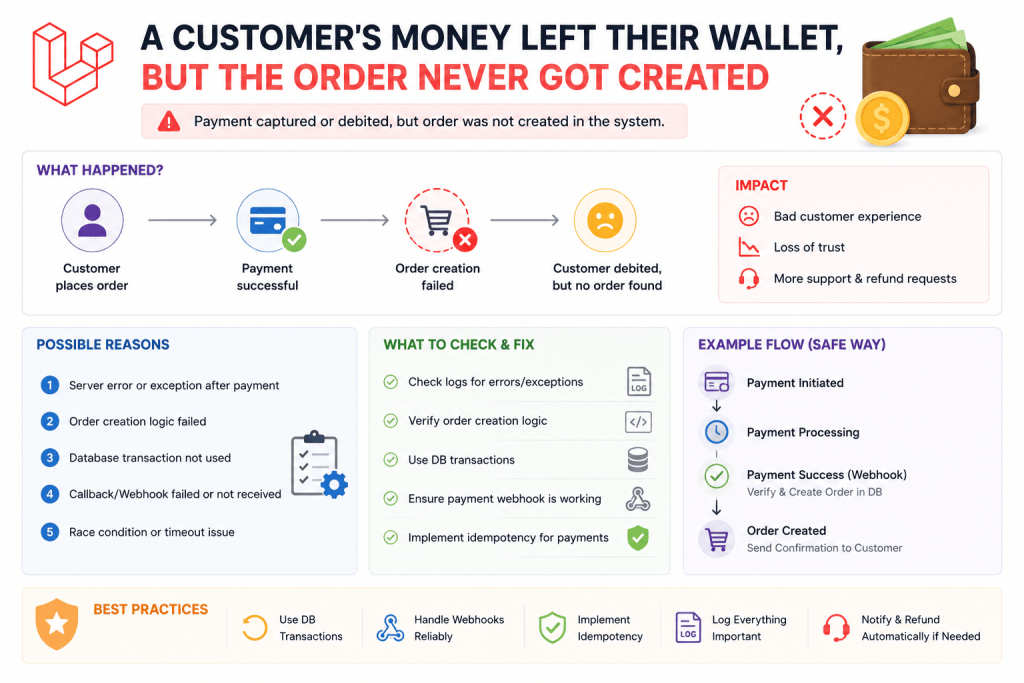
I built a simple digital wallet feature for a local tutoring platform, students could top up their wallet balance and pay for lesson bookings directly from it instead of entering card details every single time. Worked great in testing. Then a student messaged support saying their wallet balance had dropped, but no booking showed up anywhere in their account.
I checked the database and found exactly what had happened, and honestly felt a bit ill once I understood it. My booking code deducted the wallet balance first, then created the booking record afterward. Between those two steps, the server had briefly hit a memory limit error due to an unrelated issue with a different process running at the same time, and the booking creation step never actually completed. The balance deduction, though, had already gone through completely.
Money gone, no booking to show for it. That’s the exact kind of problem database transactions exist to prevent, and it’s genuinely one of those things that feels like an unnecessary precaution right up until the moment it saves you from an actual disaster.
What a Transaction Actually Does (In Plain Terms)
Think of a database transaction like a group of steps that all need to succeed together, or not happen at all. If step 3 out of 5 fails for any reason, a transaction rolls back everything, including steps 1 and 2 that already technically succeeded, as if none of it ever happened.
Without a transaction wrapping related database operations, a partial failure leaves your data in a genuinely broken, inconsistent state, exactly like that student’s wallet balance dropping without a corresponding booking ever being created.
Step 1: The Basic Transaction Wrapper
Laravel makes this remarkably simple using the DB::transaction() method:
use Illuminate\Support\Facades\DB;

DB::transaction(function () {
    $student->decrement('wallet_balance', $lessonPrice);

    Booking::create([
        'student_id' => $student->id,
        'lesson_id' => $lesson->id,
        'amount_paid' => $lessonPrice,
    ]);
});
Everything inside that closure either completes entirely, or if anything throws an exception partway through, Laravel automatically rolls back every change made inside that transaction, including the wallet balance decrement. No more partial, broken states.
This is exactly the fix I applied to the tutoring platform’s wallet system, and honestly, it took maybe fifteen minutes to implement across every place money changed hands in that app. Fifteen minutes that would’ve completely prevented that support ticket from ever happening.
Step 2: Understanding What Actually Triggers a Rollback
This part confused me a little at first, since I assumed ANY error inside the closure would trigger a rollback. That’s mostly true, but it specifically needs to be an actual thrown exception, not just a “soft” failure that your code silently handles without throwing anything.
DB::transaction(function () use ($student, $lesson, $lessonPrice) {
    $student->decrement('wallet_balance', $lessonPrice);

    $booking = Booking::create([
        'student_id' => $student->id,
        'lesson_id' => $lesson->id,
        'amount_paid' => $lessonPrice,
    ]);

    if (!$booking) {
        // This won't actually trigger a rollback on its own!
        return false;
    }
});
If Booking::create() somehow returns something unexpected without actually throwing an exception (rare, but possible depending on your validation setup), just returning false or logging an error inside the closure won’t trigger Laravel’s automatic rollback. You genuinely need to throw an exception for the rollback mechanism to kick in:
DB::transaction(function () use ($student, $lesson, $lessonPrice) {
    $student->decrement('wallet_balance', $lessonPrice);

    $booking = Booking::create([
        'student_id' => $student->id,
        'lesson_id' => $lesson->id,
        'amount_paid' => $lessonPrice,
    ]);

    if (!$booking) {
        throw new \Exception('Booking creation failed unexpectedly.');
    }
});
This distinction, silently handling an error versus actually throwing one, is genuinely important to understand, and it’s the kind of subtle detail that can leave you thinking your transaction is protecting you when it actually isn’t for certain failure scenarios.
Step 3: Manual Transactions for More Control
Sometimes you need more control than the automatic closure-based approach gives you, particularly if you want to do something specific with the exception itself, log it a certain way, or return a custom error message to the user.
DB::beginTransaction();

try {
    $student->decrement('wallet_balance', $lessonPrice);

    Booking::create([
        'student_id' => $student->id,
        'lesson_id' => $lesson->id,
        'amount_paid' => $lessonPrice,
    ]);

    DB::commit();
} catch (\Exception $e) {
    DB::rollBack();

    Log::error('Booking transaction failed: ' . $e->getMessage());

    return back()->withErrors(['error' => 'Something went wrong, your wallet was not charged.']);
}
I use this manual approach specifically when I want to log the actual failure reason somewhere (Laravel’s log file, or sometimes I’ll send it to a monitoring tool depending on the project), and give the user a genuinely helpful message rather than just a generic error page.
Step 4: A Real Example Where Transactions Prevented an Actual Multi-Step Disaster
On a different project, a small inventory management system for a local hardware store, transferring stock between two warehouse locations involved multiple steps, decreasing stock from the source warehouse, increasing it at the destination warehouse, and logging the transfer for audit purposes.
DB::transaction(function () use ($sourceWarehouse, $destinationWarehouse, $product, $quantity) {
    $sourceWarehouse->products()->where('product_id', $product->id)
        ->decrement('quantity', $quantity);

    $destinationWarehouse->products()->where('product_id', $product->id)
        ->increment('quantity', $quantity);

    StockTransferLog::create([
        'product_id' => $product->id,
        'from_warehouse_id' => $sourceWarehouse->id,
        'to_warehouse_id' => $destinationWarehouse->id,
        'quantity' => $quantity,
    ]);
});
Without a transaction here, imagine stock being deducted from the source warehouse successfully, but the increment at the destination failing due to some unexpected database constraint issue. That’s genuinely stock just vanishing from the system entirely, which for a hardware store dealing with actual physical inventory counts, would’ve caused real confusion during their next physical stock count, exactly the kind of subtle data corruption that’s hard to trace back to its actual cause weeks later.
Step 5: Being Careful With What Goes Inside a Transaction
Here’s a genuine mistake I made on an earlier project before I fully understood transactions properly. I put an external API call, sending a confirmation email through a third-party service, inside the same transaction as the database operations.
// Don't do this
DB::transaction(function () use ($booking) {
    $booking->update(['status' => 'confirmed']);
    Mail::to($booking->student)->send(new BookingConfirmed($booking));
});
The problem is, if that email sending fails or times out (which happens more often than you’d think with third-party mail services having occasional hiccups), it throws an exception, which then rolls back the ENTIRE transaction, including the booking status update that had nothing wrong with it at all. A completely unrelated external service failure was undoing legitimate, successful database changes.
The fix is keeping transactions focused purely on related database operations, and handling external calls like emails, API requests, or file uploads separately, outside the transaction, ideally using Laravel’s queued jobs so a slow or failed external call doesn’t block or corrupt your actual database logic at all:
DB::transaction(function () use ($booking) {
    $booking->update(['status' => 'confirmed']);
});

// Outside the transaction, and ideally queued
Mail::to($booking->student)->queue(new BookingConfirmed($booking));
This distinction, keeping transactions strictly for related database writes and handling external services separately, is genuinely one of the more important lessons I learned through actually messing this up once on a real project.
Step 6: Testing That Your Transactions Actually Work
I genuinely recommend deliberately testing your transaction rollback behavior rather than just assuming it works because the code looks right. On the wallet project, I temporarily added a forced exception partway through the booking process during testing:
DB::transaction(function () use ($student, $lesson, $lessonPrice) {
    $student->decrement('wallet_balance', $lessonPrice);

    throw new \Exception('Testing rollback behavior');

    Booking::create([
        'student_id' => $student->id,
        'lesson_id' => $lesson->id,
        'amount_paid' => $lessonPrice,
    ]);
});
Then checked the database afterward to confirm the wallet balance genuinely hadn’t changed, since the whole transaction should roll back including that decrement. Seeing the balance remain untouched despite the decrement line executing gave me actual confidence the rollback mechanism was working correctly, rather than just trusting it blindly based on documentation alone.
Common Mistakes I’d Warn You About
Assuming any failure automatically triggers a rollback. Only actual thrown exceptions do. Silent failures or unexpected return values won’t trigger it on their own.
Putting external API calls or email sending inside a transaction. Keep transactions focused on related database writes only. Handle external services separately, ideally queued, outside the transaction itself.
Not testing rollback behavior deliberately. Don’t just assume it works because the code looks correct, actually force a failure during testing and confirm the database genuinely reverts as expected.
Wrapping unrelated operations together in one transaction unnecessarily. If two operations genuinely aren’t dependent on each other succeeding together, they probably don’t need to be in the same transaction. Keep transactions scoped to operations that actually need to succeed or fail as a single unit.
Forgetting transactions add a small performance overhead. For genuinely simple, single-table operations that don’t involve multiple related steps, a transaction isn’t necessary at all. Use them specifically where data consistency across multiple steps actually matters.
Real Use Cases Beyond These Examples
Since learning this properly, I’ve used database transactions for:
- Processing refunds on an e-commerce platform, ensuring the payment gateway refund, order status update, and inventory restock all happen together or not at all
- A ride-sharing style app’s fare calculation and driver payout, ensuring the passenger’s charge and driver’s earnings update together consistently
- A multi-step user registration process on a membership site, ensuring a user account, subscription record, and welcome bonus credit all get created together as one consistent unit
Final Thoughts
That student’s vanished wallet balance is exactly the kind of bug that doesn’t show up during normal testing, everything works fine until something unrelated goes wrong at exactly the wrong moment mid-process. Transactions exist specifically for that scenario, protecting your data’s consistency even when something genuinely unexpected happens partway through a series of related database operations.
If you’ve got any part of your app where multiple related database changes need to happen together, payments, inventory adjustments, multi-step record creation, anything where a partial failure would leave things in a genuinely broken state, wrap it in a transaction now rather than waiting for your own version of that support ticket to teach you the same lesson.